 Georgi GerganovandPascal
d477de3ce5
Georgi GerganovandPascal
d477de3ce5
* llama : fix unexpected graph reallocation in the k-pool models

Both k-pool models built a graph shape that depends on state the
full-context reserve cannot know:

- qwen4exp branched on inp->cache_safe, which turns false as soon as
  llama_memory_seq_cp shares cells (e.g. batched-bench -pps): the QSA
  layers swapped scatter+gather for fill+concat and dropped the
  new_pool_rep leaf, so the decode graph had 12 fewer nodes than the
  reserved one
- glm5-next branched on gather = n_tokens <= 16 && n_kv > n_sel, so the
  TG decode built the gather shape (7564 nodes) while the last reserve,
  the PP one, had the dense shape (7762 nodes)

Either mismatch forces a decode-time re-reserve that drops the
worst-case sizing and bakes in the current state, so the next state
growth (n_pool, n_kv, n_new) needs more room at an unchanged graph size
and aborts under GGML_SCHED_DEBUG_REALLOC=1. Reproduce with, e.g.:

  GGML_SCHED_DEBUG_REALLOC=1 ./bin/llama-batched-bench \
    -hf ggml-org/GLM-5.3-Flash-GGUF:Q2_K -npp 2500 -ntg 32 -npl 1,2 \
    -c 32768 -pps -kvu

Always scatter+gather the pooled keys, and pick gather from context
constants only: n_ubatch bounds every ubatch, top_k + kpool - 1 bounds
n_sel. Every graph of a context then shares one shape, which the
reserve covers, and the dense path measured faster than the gather path
at 2.5k and 16k context.

Assisted-by: pi:llama.cpp/MiMo-V2.6-Flash-MOPD

* llama : drop the unused k-pool cache_safe graph API

The k-pool graphs no longer branch on cache_safe, so nothing reads
get_kpool_cache_safe() or the conditional new_pool_rep any more: both
models always pass the scatter target, which set_input_kpool now
requires instead of merely preferring.

Also drop the cache_safe copy in kpool_build_sizes(), a sizes-only
helper. The layout and state flag itself stays, it still decides which
pools a layout with shared cells must re-pool.

Assisted-by: pi:llama.cpp/MiMo-V2.6-Flash-MOPD

* tests : add a shared-seq graph reserve regression test

Decode a prompt into seq 0, share its cells with seq 1 via
llama_memory_seq_cp (what llama-batched-bench does for -pps), then keep
decoding both sequences. For the k-pool models sharing clears
cache_safe, which changes the graph topology while the pools keep
growing, so a scheduler that re-reserves with the current state
instead of the worst-case one aborts under GGML_SCHED_DEBUG_REALLOC=1.
The test registration sets that flag, and the test aborts on both
k-pool models before 2220411ec1.

kimi-linear and minimax-01 are skipped: they reserve the final pp graph
with n_seqs = 1 (see [TAG_RESERVE_DIAG_DECAY] in llama-context.cpp), so
every multi-seq graph has a different layout and re-reserves by design.

Assisted-by: pi:llama.cpp/MiMo-V2.6-Flash-MOPD

* cont : add TODOs

* cont : fix comment

* cuda: match the moe weighted reduction on empty ubatches

ggml_cuda_match_moe_weighted_reduction rejected tensors with zero
rows. A ubatch without outputs shrinks the last layer to zero rows
through inp_out_ids, so graph_optimize dropped its alloc dep there and
the scheduler graph lost one node compared to the reserved one. The
scheduler then re-reserved at the size of that ubatch, and the next
ubatch with the same node count but larger tensors aborted under
GGML_SCHED_DEBUG_REALLOC=1.

The compute loop already skips empty nodes before trying any fusion,
so the guard only made the alloc deps depend on the row count.

* tests: build the rollback test only where internal symbols link

The shared-seq case calls llm_arch_from_string, which libllama does
not export through LLAMA_API, so linking test-recurrent-state-rollback
fails on Windows with shared libraries. Its build now sits in the
NOT WIN32 OR NOT BUILD_SHARED_LIBS block, next to test-llama-archs and
the test registration it already lives under.

* tests: skip archs by name in the shared-seq reserve test

The skip of kimi-linear and minimax-01 went through llm_arch_from_string,
which libllama does not export through LLAMA_API, so the test could not
link on Windows with shared libraries. It now compares the
general.architecture string directly, and the test builds on every
platform again.

---------

Co-authored-by: Pascal <admin@serveurperso.com>
whisper.cpp


High-performance inference of OpenAI's Whisper automatic speech recognition (ASR) model:
- Plain C/C++ implementation without dependencies
- Apple Silicon first-class citizen - optimized via ARM NEON, Accelerate framework, Metal and Core ML
- AVX intrinsics support for x86 architectures
- VSX intrinsics support for POWER architectures
- Mixed F16 / F32 precision
- Integer quantization support
- Zero memory allocations at runtime
- Vulkan support
- Support for CPU-only inference
- Efficient GPU support for NVIDIA
- AMD ROCm GPU support
- AMD Ryzen AI NPU Support
- OpenVINO Support
- Ascend NPU Support
- Moore Threads GPU Support
- C-style API
- Voice Activity Detection (VAD)
Supported platforms:
- Mac OS (Intel and Arm)
- iOS
- Android
- Java
- Linux / FreeBSD
- WebAssembly
- Windows (MSVC and MinGW)
- Raspberry Pi
- Docker
The entire high-level implementation of the model is contained in whisper.h and whisper.cpp.
The rest of the code is part of the ggml machine learning library.
Having such a lightweight implementation of the model allows to easily integrate it in different platforms and applications. As an example, here is a video of running the model on an iPhone 13 device - fully offline, on-device: whisper.objc
https://user-images.githubusercontent.com/1991296/197385372-962a6dea-bca1-4d50-bf96-1d8c27b98c81.mp4
You can also easily make your own offline voice assistant application: command
https://user-images.githubusercontent.com/1991296/204038393-2f846eae-c255-4099-a76d-5735c25c49da.mp4
On Apple Silicon, the inference runs fully on the GPU via Metal:
https://github.com/ggml-org/whisper.cpp/assets/1991296/c82e8f86-60dc-49f2-b048-d2fdbd6b5225
Quick start
First clone the repository:
git clone https://github.com/ggml-org/whisper.cpp.git
Navigate into the directory:
cd whisper.cpp
Then, download one of the Whisper models converted in ggml format. For example:
sh ./models/download-ggml-model.sh base.en
Now build the whisper-cli example and transcribe an audio file like this:
# build the project
cmake -B build
cmake --build build -j --config Release

# transcribe an audio file
./build/bin/whisper-cli -f samples/jfk.wav
For a quick demo, simply run make base.en.
The command downloads the base.en model converted to custom ggml format and runs the inference on all .wav samples in the folder samples.
For detailed usage instructions, run: ./build/bin/whisper-cli -h
Note that the whisper-cli example currently runs only with 16-bit WAV files, so make sure to convert your input before running the tool.
For example, you can use ffmpeg like this:
ffmpeg -i input.mp3 -ar 16000 -ac 1 -c:a pcm_s16le output.wav
More audio samples
If you want some extra audio samples to play with, simply run:
make -j samples
This will download a few more audio files from Wikipedia and convert them to 16-bit WAV format via ffmpeg.
You can download and run the other models as follows:
make -j tiny.en
make -j tiny
make -j base.en
make -j base
make -j small.en
make -j small
make -j medium.en
make -j medium
make -j large-v1
make -j large-v2
make -j large-v3
make -j large-v3-turbo
Memory usage
| Model | Disk | Mem |
|---|---|---|
| tiny | 75 MiB | ~273 MB |
| base | 142 MiB | ~388 MB |
| small | 466 MiB | ~852 MB |
| medium | 1.5 GiB | ~2.1 GB |
| large | 2.9 GiB | ~3.9 GB |
POWER VSX Intrinsics
whisper.cpp supports POWER architectures and includes code which
significantly speeds operation on Linux running on POWER9/10, making it
capable of faster-than-realtime transcription on underclocked Raptor
Talos II. Ensure you have a BLAS package installed, and replace the
standard cmake setup with:
# build with GGML_BLAS defined
cmake -B build -DGGML_BLAS=1
cmake --build build -j --config Release
./build/bin/whisper-cli [ .. etc .. ]
Quantization
whisper.cpp supports integer quantization of the Whisper ggml models.
Quantized models require less memory and disk space and depending on the hardware can be processed more efficiently.
Here are the steps for creating and using a quantized model:
# quantize a model with Q5_0 method
cmake -B build
cmake --build build -j --config Release
./build/bin/quantize models/ggml-base.en.bin models/ggml-base.en-q5_0.bin q5_0

# run the examples as usual, specifying the quantized model file
./build/bin/whisper-cli -m models/ggml-base.en-q5_0.bin ./samples/gb0.wav
Core ML support
On Apple Silicon devices, the Encoder inference can be executed on the Apple Neural Engine (ANE) via Core ML. This can result in significant
speed-up - more than x3 faster compared with CPU-only execution. Here are the instructions for generating a Core ML model and using it with whisper.cpp:
-
Install Python dependencies needed for the creation of the Core ML model:
pip install ane_transformers pip install openai-whisper pip install coremltools- To ensure
coremltoolsoperates correctly, please confirm that Xcode is installed and executexcode-select --installto install the command-line tools. - Python 3.11 is recommended.
- MacOS Sonoma (version 14) or newer is recommended, as older versions of MacOS might experience issues with transcription hallucination.
- [OPTIONAL] It is recommended to utilize a Python version management system, such as Miniconda for this step:
- To create an environment, use:
conda create -n py311-whisper python=3.11 -y - To activate the environment, use:
conda activate py311-whisper
- To create an environment, use:
- To ensure
-
Generate a Core ML model. For example, to generate a
base.enmodel, use:./models/generate-coreml-model.sh base.enThis will generate the folder
models/ggml-base.en-encoder.mlmodelc -
Build
whisper.cppwith Core ML support:# using CMake cmake -B build -DWHISPER_COREML=1 cmake --build build -j --config Release -
Run the examples as usual. For example:
$ ./build/bin/whisper-cli -m models/ggml-base.en.bin -f samples/jfk.wav

...

whisper_init_state: loading Core ML model from 'models/ggml-base.en-encoder.mlmodelc'
whisper_init_state: first run on a device may take a while ...
whisper_init_state: Core ML model loaded

system_info: n_threads = 4 / 10 | AVX = 0 | AVX2 = 0 | AVX512 = 0 | FMA = 0 | NEON = 1 | ARM_FMA = 1 | F16C = 0 | FP16_VA = 1 | WASM_SIMD = 0 | BLAS = 1 | SSE3 = 0 | VSX = 0 | COREML = 1 |

...
The first run on a device is slow, since the ANE service compiles the Core ML model to some device-specific format. Next runs are faster.
For more information about the Core ML implementation please refer to PR #566.
ANEForge support
On Apple Silicon, the Encoder can also run on the Apple Neural Engine via ANEForge, which dispatches to the ANE directly instead of through Core ML.
It is about 2x faster than the Core ML encoder from tiny to medium (benchmarks).
The Decoder is unchanged, and no build flag is needed.
Compile the encoder into a bundle (tied to the machine and OS build that produced it):
git clone https://github.com/sbryngelson/ANEForge && cd ANEForge
pip install -e ".[models]"
PYTHONPATH=. python3 bench/whisper_encoder_ane/export_bundle.py \
    --model openai/whisper-base --out /tmp/whisper-base-encoder
Then point whisper.cpp at it:
export ANEFORGE_ENCODER=/tmp/whisper-base-encoder
export ANEFORGE_DYLIB=$PWD/aneforge/_lib/libane_e5rt_dispatch.dylib
./build/bin/whisper-cli -m models/ggml-base.bin -f samples/jfk.wav
For more information about the ANEForge implementation, see PR #3905.
OpenVINO support
On platforms that support OpenVINO, the Encoder inference can be executed on OpenVINO-supported devices including x86 CPUs and Intel GPUs (integrated & discrete).
This can result in significant speedup in encoder performance. Here are the instructions for generating the OpenVINO model and using it with whisper.cpp:
-
First, setup python virtual env. and install python dependencies. Python 3.10 is recommended.
Windows:
cd models
python -m venv openvino_conv_env
openvino_conv_env\Scripts\activate
python -m pip install --upgrade pip
pip install -r requirements-openvino.txt
Linux and macOS:
cd models python3 -m venv openvino_conv_env source openvino_conv_env/bin/activate python -m pip install --upgrade pip pip install -r requirements-openvino.txt -
Generate an OpenVINO encoder model. For example, to generate a
base.enmodel, use:python convert-whisper-to-openvino.py --model base.enThis will produce ggml-base.en-encoder-openvino.xml/.bin IR model files. It's recommended to relocate these to the same folder as
ggmlmodels, as that is the default location that the OpenVINO extension will search at runtime. -
Build
whisper.cppwith OpenVINO support:Download OpenVINO package from release page. The recommended version to use is 2026.3.0. Ready to use Binaries of the required libraries can be found in the OpenVino Archives
After downloading & extracting package onto your development system, set up required environment by sourcing setupvars script. For example:
Linux:
source /path/to/openvino_toolkit_ubuntu/setupvars.shWindows (cmd):
C:\Path\To\openvino_toolkit_windows\setupvars.batAnd then build the project using cmake:
cmake -B build -DWHISPER_OPENVINO=1 cmake --build build -j --config Release -
Run the examples as usual. For example:
$ ./build/bin/whisper-cli -m models/ggml-base.en.bin -f samples/jfk.wav

...

whisper_ctx_init_openvino_encoder: loading OpenVINO model from 'models/ggml-base.en-encoder-openvino.xml'
whisper_ctx_init_openvino_encoder: first run on a device may take a while ...
whisper_openvino_init: path_model = models/ggml-base.en-encoder-openvino.xml, device = GPU, cache_dir = models/ggml-base.en-encoder-openvino-cache
whisper_ctx_init_openvino_encoder: OpenVINO model loaded

system_info: n_threads = 4 / 8 | AVX = 1 | AVX2 = 1 | AVX512 = 0 | FMA = 1 | NEON = 0 | ARM_FMA = 0 | F16C = 1 | FP16_VA = 0 | WASM_SIMD = 0 | BLAS = 0 | SSE3 = 1 | VSX = 0 | COREML = 0 | OPENVINO = 1 |

...
The first time run on an OpenVINO device is slow, since the OpenVINO framework will compile the IR (Intermediate Representation) model to a device-specific 'blob'. This device-specific blob will get cached for the next run.
For more information about the OpenVINO implementation please refer to PR #1037.
AMD Ryzen™ AI NPU support
On AMD Ryzen™ AI 300 and 400 Series processors with a dedicated NPU, whisper.cpp can fully offload the Whisper encoder to the NPU via VitisAI, delivering significant speedup over CPU-only inference.
Prerequisites
Supported Platforms
- Windows 11
- Linux (Ubuntu 24.04 LTS, Python 3.12)
Install the XRT runtime and FlexML runtime for your platform:
- XRT: provides the NPU kernel driver and
xrt-smidiagnostic tool — on Windows this is bundled with the NPU driver; on Linux install it separately following the NPU driver installation guide - FlexML runtime (
flexmlrt): VitisAI inference engine used by whisper.cpp — download from the FlexML runtime releases
After installing, source the setup scripts in every shell you use to build or run whisper.cpp:
# Linux
source /opt/xilinx/xrt/setup.sh
source /path/to/flexmlrt/setup.sh
:: Windows
cd /path/to/flexmlrt && call setup.bat
You can verify the NPU is visible with:
xrt-smi examine
Download models
Download the ggml model and the matching prebuilt VitisAI encoder cache:
# Linux / macOS
sh ./models/download-ggml-model.sh base
sh ./models/download-vitisai-model.sh base
:: Windows
.\models\download-ggml-model.cmd base
.\models\download-vitisai-model.cmd base
Use the same model name with both scripts. To see all available VitisAI encoder caches:
sh ./models/download-vitisai-model.sh --list
.\models\download-vitisai-model.cmd --list
The VitisAI script queries the AMD Ryzen AI Whisper NPU collection on Hugging Face and downloads the .rai encoder cache as models/ggml-<model>-encoder-vitisai.rai.
Depending on the
.raicache, VitisAI may offload the encoder only, or the encoder plus cross-projection layers. whisper.cpp detects this at runtime and logs the selected offload mode during model initialization.
Build
cmake -B build -DWHISPER_VITISAI=1
cmake --build build -j --config Release
Run
./build/bin/whisper-cli -m models/ggml-base.bin -f samples/jfk.wav
For more information see the Ryzen AI documentation.
NVIDIA GPU support
With NVIDIA cards the processing of the models is done efficiently on the GPU via cuBLAS and custom CUDA kernels.
First, make sure you have installed cuda: https://developer.nvidia.com/cuda-downloads
Now build whisper.cpp with CUDA support:
cmake -B build -DGGML_CUDA=1
cmake --build build -j --config Release
or for newer NVIDIA GPU's (RTX 5000 series):
cmake -B build -DGGML_CUDA=1 -DCMAKE_CUDA_ARCHITECTURES="86"
cmake --build build -j --config Release
Vulkan GPU support
Cross-vendor solution which allows you to accelerate workload on your GPU. First, make sure your graphics card driver provides support for Vulkan API.
Now build whisper.cpp with Vulkan support:
cmake -B build -DGGML_VULKAN=1
cmake --build build -j --config Release
AMD ROCm GPU support
With AMD GPUs the processing can be accelerated via HIP/ROCm. First, make sure you have installed ROCm.
Now build whisper.cpp with HIP support:
cmake -B build -DGGML_HIP=1 -DAMDGPU_TARGETS="gfx1201"
cmake --build build -j --config Release
Replace gfx1201 with your GPU architecture. You can find it with:
rocminfo | grep "gfx"
Common architectures: gfx1100 (RX 7900 XTX), gfx1101 (RX 7800 XT), gfx1201 (RX 9070 XT).
For multiple GPUs with different architectures: -DAMDGPU_TARGETS="gfx1100;gfx1201".
BLAS CPU support via OpenBLAS
Encoder processing can be accelerated on the CPU via OpenBLAS.
First, make sure you have installed openblas: https://www.openblas.net/
Now build whisper.cpp with OpenBLAS support:
cmake -B build -DGGML_BLAS=1
cmake --build build -j --config Release
Ascend NPU support
Ascend NPU provides inference acceleration via CANN and AI cores.
First, check if your Ascend NPU device is supported:
Verified devices
| Ascend NPU | Status |
|---|---|
| Atlas 300T A2 | Support |
| Atlas 300I Duo | Support |
Then, make sure you have installed CANN toolkit . The latest version of CANN is recommended.
Now build whisper.cpp with CANN support:
cmake -B build -DGGML_CANN=1
cmake --build build -j --config Release
Run the inference examples as usual, for example:
./build/bin/whisper-cli -f samples/jfk.wav -m models/ggml-base.en.bin -t 8
Notes:
- If you have trouble with Ascend NPU device, please create a issue with [CANN] prefix/tag.
- If you run successfully with your Ascend NPU device, please help update the table
Verified devices.
Moore Threads GPU support
With Moore Threads cards the processing of the models is done efficiently on the GPU via muBLAS and custom MUSA kernels.
First, make sure you have installed MUSA SDK rc4.2.0: https://developer.mthreads.com/sdk/download/musa?equipment=&os=&driverVersion=&version=4.2.0
Now build whisper.cpp with MUSA support:
cmake -B build -DGGML_MUSA=1
cmake --build build -j --config Release
or specify the architecture for your Moore Threads GPU. For example, if you have a MTT S80 GPU, you can specify the architecture as follows:
cmake -B build -DGGML_MUSA=1 -DMUSA_ARCHITECTURES="21"
cmake --build build -j --config Release
FFmpeg support (examples only)
By default, the examples in this repo use the miniaudio library to decode audio files.
Some of the examples also can use FFmpeg for decoding and broader format support. To enable that, build with WHISPER_COMMON_FFMPEG.
First, you need to install required libraries:
# Debian/Ubuntu
sudo apt install libavcodec-dev libavformat-dev libavutil-dev

# RHEL/Fedora
sudo dnf install libavcodec-free-devel libavformat-free-devel libavutil-free-devel
Then you can build the project as follows:
cmake -B build -D WHISPER_COMMON_FFMPEG=yes
cmake --build build
Run the following example to confirm it's working:
# Convert an audio file to Opus format
ffmpeg -i samples/jfk.wav jfk.opus

# Transcribe the audio file
./build/bin/whisper-cli --model models/ggml-base.en.bin --file jfk.opus
Docker
Prerequisites
- Docker must be installed and running on your system.
- Create a folder to store big models & intermediate files (ex. /whisper/models)
Images
We have multiple Docker images available for this project:
ghcr.io/ggml-org/whisper.cpp:main: This image includes the main executable file as well ascurlandffmpeg. (platforms:linux/amd64,linux/arm64)ghcr.io/ggml-org/whisper.cpp:main-cuda: Same asmainbut compiled with CUDA support. (platforms:linux/amd64)ghcr.io/ggml-org/whisper.cpp:main-musa: Same asmainbut compiled with MUSA support. (platforms:linux/amd64)ghcr.io/ggml-org/whisper.cpp:main-vulkan: Same asmainbut compiled with Vulkan support. (platforms:linux/amd64)
Usage
# Use the main tag or: cublas, main-cuda, main-intel, main-musa, main-rocm, main-vulkan.
IMAGE="ghcr.io/ggml-org/whisper.cpp:main"
MODEL_PATH="/tmp/whisper.cpp-models"
AUDIO_PATH="/tmp/whisper.cpp-audio"
AUDIO_URL="https://github.com/ggml-org/whisper.cpp/raw/refs/heads/master/samples/jfk.wav"
mkdir -p "$MODEL_PATH" "$AUDIO_PATH"
wget -O "$AUDIO_PATH/jfk.wav" "$AUDIO_URL"

# download model and persist it in a local folder
docker run -it --rm \
  -v $MODEL_PATH:/models \
  $IMAGE \
  download-ggml-model.sh base /models

# transcribe an audio file
docker run -it --rm \
  -v $MODEL_PATH:/models \
  -v $AUDIO_PATH:/audios \
  $IMAGE \
  whisper-cli -m /models/ggml-base.bin -f /audios/jfk.wav

# run the web server
docker run -it --rm \
  -p "8080:8080" \
  -v $MODEL_PATH:/models \
  $IMAGE \
  whisper-server --host 0.0.0.0 -m /models/ggml-base.bin
# then:
curl -v http://127.0.0.1:8080/inference \
  -F "file=@${AUDIO_PATH}/jfk.wav" \
  -F 'response_format=json'

# download small.en and run the bench on it using 4 threads
docker run -it --rm \
  -v $MODEL_PATH:/models \
  $IMAGE \
  download-ggml-model.sh small.en /models
docker run -it --rm \
  -v $MODEL_PATH:/models \
  $IMAGE \
  whisper-bench -m /models/ggml-small.en.bin -t 4

# the methods above use the CPU - use your GPU by sharing the device, for example, for an AMD iGPU via Vulkan:
docker run --rm \
  --device /dev/dri \
  -v $MODEL_PATH:/models \
  "ghcr.io/ggml-org/whisper.cpp:main-vulkan" \
  whisper-bench -m /models/ggml-small.en.bin -t 4
Installing with Conan
You can install pre-built binaries for whisper.cpp or build it from source using Conan. Use the following command:
conan install --requires="whisper-cpp/[*]" --build=missing
For detailed instructions on how to use Conan, please refer to the Conan documentation.
Limitations
- Inference only
Real-time audio input example
This is a naive example of performing real-time inference on audio from your microphone. The stream tool samples the audio every half a second and runs the transcription continuously. More info is available in issue #10. You will need to have sdl2 installed for it to work properly.
cmake -B build -DWHISPER_SDL2=ON
cmake --build build -j --config Release
./build/bin/whisper-stream -m ./models/ggml-base.en.bin -t 8 --step 500 --length 5000
https://user-images.githubusercontent.com/1991296/194935793-76afede7-cfa8-48d8-a80f-28ba83be7d09.mp4
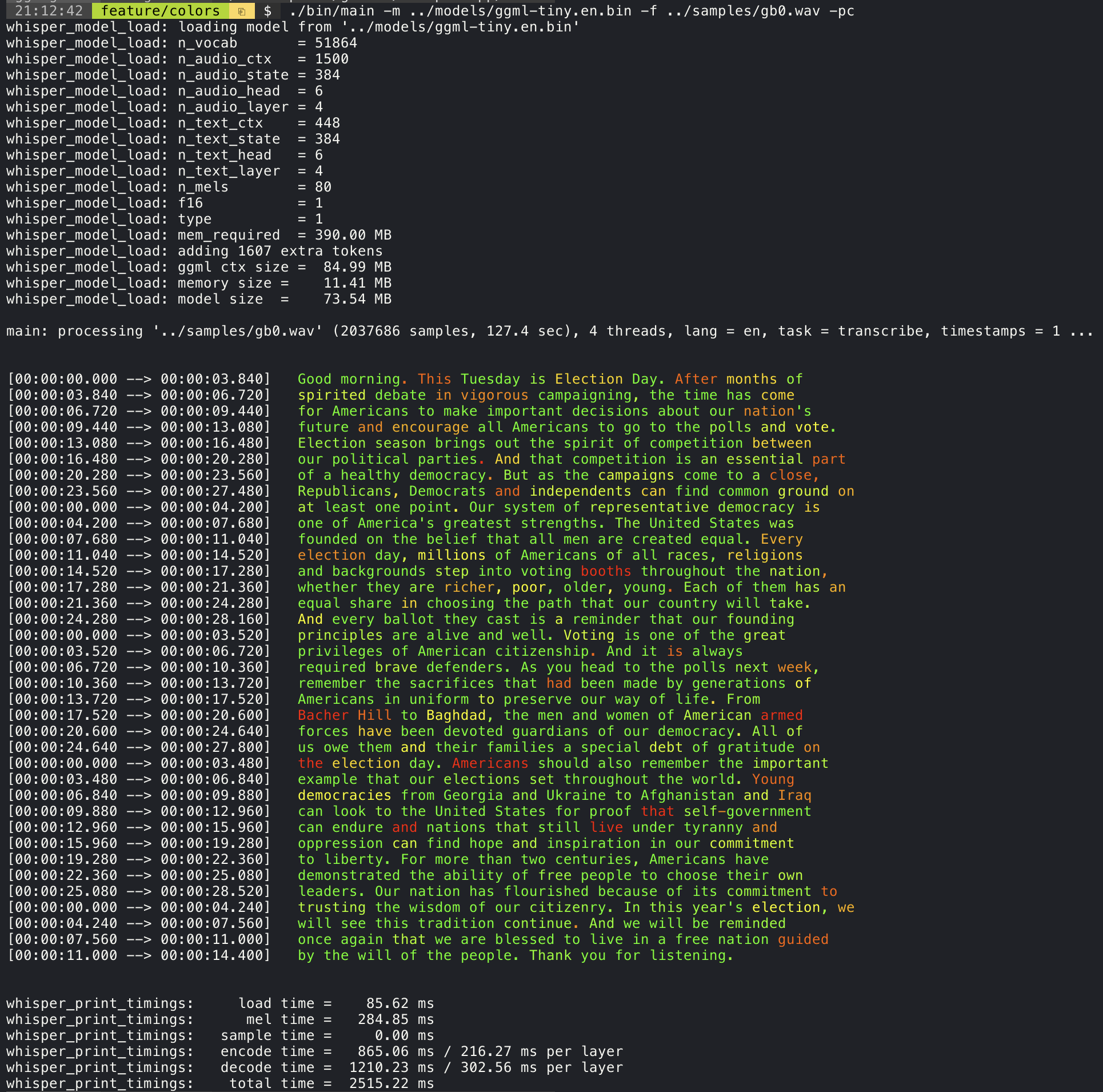
Confidence color-coding
Adding the --print-colors argument will print the transcribed text using an experimental color coding strategy
to highlight words with high or low confidence:
./build/bin/whisper-cli -m models/ggml-base.en.bin -f samples/gb0.wav --print-colors
Controlling the length of the generated text segments (experimental)
For example, to limit the line length to a maximum of 16 characters, simply add -ml 16:
$ ./build/bin/whisper-cli -m ./models/ggml-base.en.bin -f ./samples/jfk.wav -ml 16

whisper_model_load: loading model from './models/ggml-base.en.bin'
...
system_info: n_threads = 4 / 10 | AVX2 = 0 | AVX512 = 0 | NEON = 1 | FP16_VA = 1 | WASM_SIMD = 0 | BLAS = 1 |

main: processing './samples/jfk.wav' (176000 samples, 11.0 sec), 4 threads, 1 processors, lang = en, task = transcribe, timestamps = 1 ...

[00:00:00.000 --> 00:00:00.850]   And so my
[00:00:00.850 --> 00:00:01.590]   fellow
[00:00:01.590 --> 00:00:04.140]   Americans, ask
[00:00:04.140 --> 00:00:05.660]   not what your
[00:00:05.660 --> 00:00:06.840]   country can do
[00:00:06.840 --> 00:00:08.430]   for you, ask
[00:00:08.430 --> 00:00:09.440]   what you can do
[00:00:09.440 --> 00:00:10.020]   for your
[00:00:10.020 --> 00:00:11.000]   country.
Word-level timestamp (experimental)
The --max-len argument can be used to obtain word-level timestamps. Simply use -ml 1:
$ ./build/bin/whisper-cli -m ./models/ggml-base.en.bin -f ./samples/jfk.wav -ml 1

whisper_model_load: loading model from './models/ggml-base.en.bin'
...
system_info: n_threads = 4 / 10 | AVX2 = 0 | AVX512 = 0 | NEON = 1 | FP16_VA = 1 | WASM_SIMD = 0 | BLAS = 1 |

main: processing './samples/jfk.wav' (176000 samples, 11.0 sec), 4 threads, 1 processors, lang = en, task = transcribe, timestamps = 1 ...

[00:00:00.000 --> 00:00:00.320]
[00:00:00.320 --> 00:00:00.370]   And
[00:00:00.370 --> 00:00:00.690]   so
[00:00:00.690 --> 00:00:00.850]   my
[00:00:00.850 --> 00:00:01.590]   fellow
[00:00:01.590 --> 00:00:02.850]   Americans
[00:00:02.850 --> 00:00:03.300]  ,
[00:00:03.300 --> 00:00:04.140]   ask
[00:00:04.140 --> 00:00:04.990]   not
[00:00:04.990 --> 00:00:05.410]   what
[00:00:05.410 --> 00:00:05.660]   your
[00:00:05.660 --> 00:00:06.260]   country
[00:00:06.260 --> 00:00:06.600]   can
[00:00:06.600 --> 00:00:06.840]   do
[00:00:06.840 --> 00:00:07.010]   for
[00:00:07.010 --> 00:00:08.170]   you
[00:00:08.170 --> 00:00:08.190]  ,
[00:00:08.190 --> 00:00:08.430]   ask
[00:00:08.430 --> 00:00:08.910]   what
[00:00:08.910 --> 00:00:09.040]   you
[00:00:09.040 --> 00:00:09.320]   can
[00:00:09.320 --> 00:00:09.440]   do
[00:00:09.440 --> 00:00:09.760]   for
[00:00:09.760 --> 00:00:10.020]   your
[00:00:10.020 --> 00:00:10.510]   country
[00:00:10.510 --> 00:00:11.000]  .
Speaker segmentation via tinydiarize (experimental)
More information about this approach is available here: https://github.com/ggml-org/whisper.cpp/pull/1058
Sample usage:
# download a tinydiarize compatible model
./models/download-ggml-model.sh small.en-tdrz

# run as usual, adding the "-tdrz" command-line argument
./build/bin/whisper-cli -f ./samples/a13.wav -m ./models/ggml-small.en-tdrz.bin -tdrz
...
main: processing './samples/a13.wav' (480000 samples, 30.0 sec), 4 threads, 1 processors, lang = en, task = transcribe, tdrz = 1, timestamps = 1 ...
...
[00:00:00.000 --> 00:00:03.800]   Okay Houston, we've had a problem here. [SPEAKER_TURN]
[00:00:03.800 --> 00:00:06.200]   This is Houston. Say again please. [SPEAKER_TURN]
[00:00:06.200 --> 00:00:08.260]   Uh Houston we've had a problem.
[00:00:08.260 --> 00:00:11.320]   We've had a main beam up on a volt. [SPEAKER_TURN]
[00:00:11.320 --> 00:00:13.820]   Roger main beam interval. [SPEAKER_TURN]
[00:00:13.820 --> 00:00:15.100]   Uh uh [SPEAKER_TURN]
[00:00:15.100 --> 00:00:18.020]   So okay stand, by thirteen we're looking at it. [SPEAKER_TURN]
[00:00:18.020 --> 00:00:25.740]   Okay uh right now uh Houston the uh voltage is uh is looking good um.
[00:00:27.620 --> 00:00:29.940]   And we had a a pretty large bank or so.
Karaoke-style movie generation (experimental)
The whisper-cli example provides support for output of karaoke-style movies, where the
currently pronounced word is highlighted. Use the -owts argument and run the generated bash script.
This requires to have ffmpeg installed.
Here are a few "typical" examples:
./build/bin/whisper-cli -m ./models/ggml-base.en.bin -f ./samples/jfk.wav -owts
source ./samples/jfk.wav.wts
ffplay ./samples/jfk.wav.mp4
https://user-images.githubusercontent.com/1991296/199337465-dbee4b5e-9aeb-48a3-b1c6-323ac4db5b2c.mp4
./build/bin/whisper-cli -m ./models/ggml-base.en.bin -f ./samples/mm0.wav -owts
source ./samples/mm0.wav.wts
ffplay ./samples/mm0.wav.mp4
https://user-images.githubusercontent.com/1991296/199337504-cc8fd233-0cb7-4920-95f9-4227de3570aa.mp4
./build/bin/whisper-cli -m ./models/ggml-base.en.bin -f ./samples/gb0.wav -owts
source ./samples/gb0.wav.wts
ffplay ./samples/gb0.wav.mp4
https://user-images.githubusercontent.com/1991296/199337538-b7b0c7a3-2753-4a88-a0cd-f28a317987ba.mp4
Video comparison of different models
Use the scripts/bench-wts.sh script to generate a video in the following format:
./scripts/bench-wts.sh samples/jfk.wav
ffplay ./samples/jfk.wav.all.mp4
https://user-images.githubusercontent.com/1991296/223206245-2d36d903-cf8e-4f09-8c3b-eb9f9c39d6fc.mp4
Benchmarks
In order to have an objective comparison of the performance of the inference across different system configurations, use the whisper-bench tool. The tool simply runs the Encoder part of the model and prints how much time it took to execute it. The results are summarized in the following Github issue:
Additionally a script to run whisper.cpp with different models and audio files is provided bench.py.
You can run it with the following command, by default it will run against any standard model in the models folder.
python3 scripts/bench.py -f samples/jfk.wav -t 2,4,8 -p 1,2
It is written in python with the intention of being easy to modify and extend for your benchmarking use case.
It outputs a csv file with the results of the benchmarking.
ggml format
The original models are converted to a custom binary format. This allows to pack everything needed into a single file:
- model parameters
- mel filters
- vocabulary
- weights
You can download the converted models using the models/download-ggml-model.sh script or manually from here:
For more details, see the conversion script models/convert-pt-to-ggml.py or models/README.md.
Bindings
- Rust: tazz4843/whisper-rs | #310
- JavaScript: bindings/javascript | #309
- React Native (iOS / Android): whisper.rn
- Go: bindings/go | #312
- Java:
- Ruby: bindings/ruby | #507
- Objective-C / Swift: ggml-org/whisper.spm | #313
- .NET: | #422
- Python: | #9
- stlukey/whispercpp.py (Cython)
- AIWintermuteAI/whispercpp (Updated fork of aarnphm/whispercpp)
- aarnphm/whispercpp (Pybind11)
- abdeladim-s/pywhispercpp (Pybind11)
- R: bnosac/audio.whisper
- Unity: macoron/whisper.unity
XCFramework
The XCFramework is a precompiled version of the library for iOS, visionOS, tvOS, and macOS. It can be used in Swift projects without the need to compile the library from source. For example, the v1.7.5 version of the XCFramework can be used as follows:
// swift-tools-version: 5.10
// The swift-tools-version declares the minimum version of Swift required to build this package.

import PackageDescription

let package = Package(
    name: "Whisper",
    targets: [
        .executableTarget(
            name: "Whisper",
            dependencies: [
                "WhisperFramework"
            ]),
        .binaryTarget(
            name: "WhisperFramework",
            url: "https://github.com/ggml-org/whisper.cpp/releases/download/v1.7.5/whisper-v1.7.5-xcframework.zip",
            checksum: "c7faeb328620d6012e130f3d705c51a6ea6c995605f2df50f6e1ad68c59c6c4a"
        )
    ]
)
Voice Activity Detection (VAD)
Support for Voice Activity Detection (VAD) can be enabled using the --vad
argument to whisper-cli. In addition to this option a VAD model is also
required.
The way this works is that first the audio samples are passed through the VAD model which will detect speech segments. Using this information, only the speech segments that are detected are extracted from the original audio input and passed to whisper for processing. This reduces the amount of audio data that needs to be processed by whisper and can significantly speed up the transcription process.
The following VAD models are currently supported:
Silero-VAD
Silero-vad is a lightweight VAD model written in Python that is fast and accurate.
Models can be downloaded by running the following command on Linux or MacOS:
$ ./models/download-vad-model.sh silero-v6.2.0
Downloading ggml model silero-v6.2.0 from 'https://huggingface.co/ggml-org/whisper-vad' ...
ggml-silero-v6.2.0.bin        100%[==============================================>] 864.35K  --.-KB/s    in 0.04s
Done! Model 'silero-v6.2.0' saved in '/path/models/ggml-silero-v6.2.0.bin'
You can now use it like this:

  $ ./build/bin/whisper-cli -vm /path/models/ggml-silero-v6.2.0.bin --vad -f samples/jfk.wav -m models/ggml-base.en.bin
And the following command on Windows:
> .\models\download-vad-model.cmd silero-v6.2.0
Downloading vad model silero-v6.2.0...
Done! Model silero-v6.2.0 saved in C:\Users\danie\work\ai\whisper.cpp\ggml-silero-v6.2.0.bin
You can now use it like this:

C:\path\build\bin\Release\whisper-cli.exe -vm C:\path\ggml-silero-v6.2.0.bin --vad -m models/ggml-base.en.bin -f samples\jfk.wav
To see a list of all available models, run the above commands without any arguments.
This model can be also be converted manually to ggml using the following command:
$ python3 -m venv venv && source venv/bin/activate
$ (venv) pip install silero-vad
$ (venv) $ python models/convert-silero-vad-to-ggml.py --output models/silero.bin
Saving GGML Silero-VAD model to models/silero-v6.2.0-ggml.bin
And it can then be used with whisper as follows:
$ ./build/bin/whisper-cli \
   --file ./samples/jfk.wav \
   --model ./models/ggml-base.en.bin \
   --vad \
   --vad-model ./models/silero-v6.2.0-ggml.bin
VAD Options
-
--vad-threshold: Threshold probability for speech detection. A probability for a speech segment/frame above this threshold will be considered as speech.
-
--vad-min-speech-duration-ms: Minimum speech duration in milliseconds. Speech segments shorter than this value will be discarded to filter out brief noise or false positives.
-
--vad-min-silence-duration-ms: Minimum silence duration in milliseconds. Silence periods must be at least this long to end a speech segment. Shorter silence periods will be ignored and included as part of the speech.
-
--vad-max-speech-duration-s: Maximum speech duration in seconds. Speech segments longer than this will be automatically split into multiple segments at silence points exceeding 98ms to prevent excessively long segments.
-
--vad-speech-pad-ms: Speech padding in milliseconds. Adds this amount of padding before and after each detected speech segment to avoid cutting off speech edges.
-
--vad-samples-overlap: Amount of audio to extend from each speech segment into the next one, in seconds (e.g., 0.10 = 100ms overlap). This ensures speech isn't cut off abruptly between segments when they're concatenated together.
Examples
There are various examples of using the library for different projects in the examples folder. Some of the examples are even ported to run in the browser using WebAssembly. Check them out!
| Example | Web | Description |
|---|---|---|
| whisper-cli | whisper.wasm | Tool for translating and transcribing audio using Whisper |
| whisper-bench | bench.wasm | Benchmark the performance of Whisper on your machine |
| whisper-stream | stream.wasm | Real-time transcription of raw microphone capture |
| whisper-command | command.wasm | Basic voice assistant example for receiving voice commands from the mic |
| whisper-server | HTTP transcription server with OAI-like API | |
| whisper-talk-llama | Talk with a LLaMA bot | |
| whisper.objc | iOS mobile application using whisper.cpp | |
| whisper.swiftui | SwiftUI iOS / macOS application using whisper.cpp | |
| whisper.android | Android mobile application using whisper.cpp | |
| whisper.nvim | Speech-to-text plugin for Neovim | |
| generate-karaoke.sh | Helper script to easily generate a karaoke video of raw audio capture | |
| livestream.sh | Livestream audio transcription | |
| yt-wsp.sh | Download + transcribe and/or translate any VOD (original) | |
| wchess | wchess.wasm | Voice-controlled chess |
Discussions
If you have any kind of feedback about this project feel free to use the Discussions section and open a new topic.
You can use the Show and tell category
to share your own projects that use whisper.cpp. If you have a question, make sure to check the
Frequently asked questions (#126) discussion.