 43cbe41574
* OpenVINO backend: 1) enable gpt-oss moe on OV bk; 2) enable mxfp4 support

* OpenVINO backend: disable TOPK_MOE op test

* OpenVINO Backend: Add op FILL support

* OpenVINO backend: enable set rows with multi dims

* fix the name missmatch in setrow + view

* OpenVINO backend: enable op GGML_UNARY_OP_SIGMOID

* OpenVINO Backend: enable SQR & SQRT

* OpenVINO backend: 1) ensure unique node names for OpenVINO; 2) add org_src to recorde the src ggml tensor for OpenVINO dynamic shape infer

* OpenVINO backend: enable fallback for openVINO to CPU backend

* OpenVINO backend: fix accurace issue in gemma3n arch test

* fix mpt failed case

* OpenVINO backend: clean nodeinfo

* OpenVINO Backend: enable zero-size copy for view

* add concat ssm_conv in compute_dynamic_dim

enable qwen35

Fix after rebase

remove logging

* OpenVINO backend: disable EXP with FP32, which failed in op test. Root reason: the backend test initializes unary op inputs over a wide range, [-150, 150]. For FP32, exp(x) overflows around x ~= 88.7, so this test can randomly generate values right in or beyond the overflow region

* OpenVINO backend: fix CPY op test failed issue

* OpenVINO backend: fix GATED_DELTA_NET op test failed issue

* handle in-place op, handle qwen35 dynamic clearing of cache in cgraph

* handle qwen35 dynamic clearing of cache correctly

* Enable qwen35 dense multi seq

* Fix qwen35 9b gqa

* Fix after rebase

* Disable SOLVE_TRI

* openvino: fix NEOX RoPE accuracy on GPU stateful (mixed-rank Multiply)

In stateful mode the NEOX RoPE branch fed rank-3 data ([S, n_heads,
head_size]) into the Multiply against the rank-4 cos/sin tables
([1, S, 1, n_dims/2]). That mixed-rank broadcast is miscomputed by the
OpenVINO GPU plugin, corrupting the rotated Q/K and producing garbage
output (e.g. Phi-3-mini). Lift the data to rank-4 before the split/
Multiply so the operands are equal-rank, matching what the TYPE_NORMAL
branch already does. CPU and stateless paths are unaffected.

Phi-3-mini-Q4_K_M, wiki.test perplexity, GPU stateful:
  before: PPL = 27120.43
  after:  PPL = 6.2263   (CPU reference: 6.2251)

* OpenVINO backend: 1) remove the unique name in llama.cpp; 2) add new ov name in ov bk; 3) fix issue in arch test & op test with latest code update

* OpenVINO Backenb: remove changes in llama.cpp

* Doc change (use x64 Native Tools Command Prompt for VS)

* Cleaner sentence

Co-authored-by: Copilot Autofix powered by AI <175728472+Copilot@users.noreply.github.com>

* OpenVINO Backend: cache key upgrade includes all src name

* OpenVINO Backend: enable llama arch test on ci

* OpenVINO Backend: move parameter node creating from decoder into translate

* OpenVINO Backend: create extra input ov node move from decoder to translate

* fix for op regression due to is_model_splitted

* openvino: fix CPY writeback for recurrent state rollback

Detect the rollback conv/gdn state writeback CPY nodes structurally
instead of by tensor name, since the rollback path in
build_conv_state does not call cb() and left the nodes unnamed. Add
per-node runtime offsets (rs_slot_begin_*, rs_src_begin_*) so the
cached IR handles any kv head, sequence count and snapshot slot for
both the conv state and the GDN state writeback.

Assisted-by: GitHub Copilot

* qwen35 moe

* optimize MoE expert aggregation with ReduceSum

* Skip GET_ROWS inaccurate test

* openvino: fallback dynamic MUL_MAT_ID shapes

* OpenVINO Backend: fix error in arch test model mpt

* fix error caused by cpy in arch test model kimi-linear

* OpenVINO Backend: fix error in arch test model minimax-m3

* openvino: fix GPU mul_mat_id op tests

* ggml-openvino: add GGML_OPENVINO_RELEASE_WEIGHTS to reclaim host weight RSS on GPU

The OpenVINO weight Constants are zero-copy views into host buffers
allocated by the backend (ggml_aligned_malloc, anonymous memory). On GPU
the plugin holds its own device copy after compile_model, so these host
pages are dead weight for inference. For a 1B Q4_K_M model this leaves
~850 MB of host RSS resident that the GPU path never reads again.

Add an opt-in GGML_OPENVINO_RELEASE_WEIGHTS mode that madvise(MADV_DONTNEED)s
the registered host weight buffers once the model is compiled, dropping
their resident pages while keeping the mappings valid (ggml still owns the
lifetime; tensors still point in). Measured steady-state RSS drops from
~1555 MB to ~710 MB on Llama-3.2-1B-Q4_K_M (Arc iGPU) with unchanged
throughput and correct output.

The GPU backend uses a single dynamic-shape model for both prefill and
decode, so a graph is compiled once and reused; the only event that forces
a recompile is clear_caches() on backend teardown. The change therefore:
  - releases on the first cache-hit (model compiled, plugin has its copy);
  - pins the compiled-model cache across backend teardown so a later
    context reuses it instead of recompiling against the dropped pages;
  - fails loud (GGML_ABORT) on a cache-miss recompile or on a second model
    load, both of which would otherwise read zeroed weights or silently
    reuse the wrong compiled graph.

Scope/limitations (all fail loud, never silently wrong): GPU only (the CPU
plugin reads the host Constants at inference time), one model per process,
and stable graph shapes. This reduces steady-state RSS, not the transient
compile-time peak. All changes are confined to the OpenVINO backend.

* ggml-openvino: stream weight requantization to cut the compile-time RSS peak

requantize_to_buffers() dequantized the entire tensor to a temporary
std::vector<float> of n_elements before requantizing. For token_embd.weight
(128256 x 2048) that transient is ~1 GB (1B model) / ~2 GB (8B), and it is
the single largest contributor to the OpenVINO compile-time memory peak --
it also fires twice for token_embd (once at load, once at graph build,
because token_embd is loaded via a CPU/mmap buffer and not cached as an OV
weight extra).

Stream the dequant instead: process a fixed window of complete rows
(CHUNK_ROWS=256) into a small scratch buffer and quantize/convert each chunk
straight into the output buffers. The transient F32 footprint is now
CHUNK_ROWS*ne0 floats regardless of tensor size.

quantize_q8_0/q8_1 gain an optional block_offset arg (default 0) so a chunk
writes its weights/scales/zp at the correct block. Streaming is applied to
the Q8_0_C / Q8_1_C / F16 targets (the large requant cases); the u4 (Q4_0)
path keeps the whole-array call because it packs two weights per byte with
running zp ORs, and a fallback handles any future target whose block size
does not divide a row.

Measured peak RSS (cold compile, GPU): 1B 2868 -> 1809 MB (-1.06 GB);
8B 11618 -> 9608 MB (-2.0 GB). Output verified unchanged
("capital of France is Paris"); throughput unchanged. Unlike
GGML_OPENVINO_RELEASE_WEIGHTS this reduces the transient peak, not just
steady-state, and needs no env flag. All changes confined to the OpenVINO
backend.

* ggml-openvino: avoid redundant token_embd requantization at compile

token_embd.weight is referenced twice in the graph path: as the GET_ROWS
embedding (a CPU/mmap-buffer tensor) it was re-extracted/re-requantized on
every weight-node build, and is_model_splitted() built a full (naive) set of
weight nodes just to test name membership — each requant is a ~1-2 GB F32
dequant of the 262M-element embedding.

Two changes:
- Add collect_weight_names(): a name-only collector for topology checks.
  is_model_splitted() now uses it instead of create_weight_nodes(cgraph,
  true), so the splitted-check no longer triggers any weight extraction.
- Memoize weight nodes built from non-OpenVINO buffers in a process-lifetime
  cache keyed by tensor->data. These tensors have no OV buffer context to own
  a cached extra, so without this they were rebuilt on every (re)compile;
  prefill and decode graphs now share one build (verified: 2nd graph hits the
  cache instead of re-requantizing).

Peak RSS is unchanged (the streaming-requant commit already removed the F32
transient); this removes redundant compile-time work. Output verified
unchanged ("capital of France is Paris"). Confined to the OpenVINO backend.

* ggml-openvino: gate compile-memory optimizations behind GGML_OPENVINO_REDUCE_COMPILE_MEM

The streaming requantization and the non-OpenVINO-buffer weight-node cache
(plus the name-only is_model_splitted path that pairs with it) are now opt-in
via GGML_OPENVINO_REDUCE_COMPILE_MEM. When unset, requantize_to_buffers()
fully materializes the F32 buffer and weights are rebuilt per compile exactly
as before; when set, the streaming path and the cross-compile weight cache
are used.

Default off keeps behavior identical to upstream unless explicitly enabled.
Verified: flag off -> peak RSS 2800 MB (original), flag on -> 1810 MB; output
"capital of France is Paris" in both modes. (GGML_OPENVINO_RELEASE_WEIGHTS,
added earlier, remains a separate opt-in for the steady-state release.)

* ggml-openvino: add frontend model cache (GGML_OPENVINO_MODEL_CACHE_DIR)

The plugin-level ov::cache_dir caches the compiled blob keyed by the OV
model, but producing that model still runs the full frontend every time:
weight requantization (incl. the large token_embd F32 transient) and the
ggml->OV graph conversion. This adds an opt-in frontend cache keyed off a
fingerprint computed directly from the ggml cgraph, so a hit imports a
previously exported CompiledModel and skips requant + convert + compile
entirely.

Key (model-cache.{h,cpp}) = 64-bit FNV-1a of: graph topology (n_nodes + per
node op/name), a sampled per-weight fingerprint (name/shape/type + bounded
head+tail byte sample), and blob-affecting config (device, flash-attn, rope
params, REDUCE_COMPILE_MEM/stateful flags, OpenVINO version). A sidecar
manifest stores every weight's fingerprint and is re-verified on load, so a
sampled-hash collision cannot cause a wrong-model hit (verified: two
different quantizations of the same model produce distinct cache entries).

Flow (dynamic single-model path only; split models defer to ov::cache_dir):
on a verified hit, core.import_model() restores the CompiledModel and a
lightweight decoder is built with a names-only weight map (membership is all
the decoder needs for I/O mapping; weights live in the imported model). On a
miss, compile as usual then export the blob (atomic temp+rename, manifest
written first). The frontend cache supersedes ov::cache_dir, so CACHE_DIR/
CACHE_MODE are stripped from the config used for the cached compile and the
import — a blob compiled with cache_dir set cannot be re-imported.

Measured 8B Q4_K_M (GPU): full requant+convert+compile 15.3s -> import 6.3s
(~2.4x faster compile phase). Output verified unchanged on cold and warm,
standalone and combined with REDUCE_COMPILE_MEM + RELEASE_WEIGHTS. Default
off; confined to the OpenVINO backend.

* ggml-openvino: harden frontend model cache correctness

The frontend model cache imports a previously exported CompiledModel keyed by a fingerprint of the ggml graph, weights, and blob-affecting config. The original key covered device, stateful execution, REDUCE_COMPILE_MEM, RoPE params, OpenVINO version, topology, and sampled weights, but missed runtime/frontend toggles that can change the lowered graph or the I/O binding contract. That made it possible to reuse a blob produced under a different OpenVINO backend configuration.

Add a small extra-config helper for the dynamic model-cache path and fold in the effective values of GGML_OPENVINO_DISABLE_KV_SLICE and GGML_OPENVINO_MANUAL_GQA_ATTN. MANUAL_GQA_ATTN is keyed by the behavior that actually takes effect: an explicit env value wins, otherwise GPU defaults to enabled and other devices default to disabled. This matches flash_attn_ext lowering and avoids unnecessary cache splits for equivalent configurations while separating genuinely different attention graphs.

DISABLE_KV_SLICE is also included because it changes the KV-cache tensor shape/output binding strategy used around imported models. Even when weights and graph topology are identical, switching this flag should not inherit a CompiledModel cache entry created for a different binding mode.

Also make cache artifact publication cleaner: write manifest.tmp and blob.tmp, publish the blob first, and publish the manifest last. Cache hits already require both blob and a verified manifest, so making the manifest the final visible artifact avoids leaving an apparently complete manifest for a failed or interrupted blob export. Temporary files are removed on the handled failure paths.

While touching this path, fix the indentation of the non-imported compile branch so the cache miss flow is easier to review. Behavior is otherwise unchanged: verified hits still import, misses still create weights, convert, compile, export, and create the infer request normally.

* ggml-openvino: add memory optimization umbrella switch

Add GGML_OPENVINO_MEMORY_OPTIMIZE as a single opt-in switch for the OpenVINO backend memory-saving paths. The existing fine-grained GGML_OPENVINO_REDUCE_COMPILE_MEM and GGML_OPENVINO_RELEASE_WEIGHTS variables remain supported and explicitly override the umbrella switch when set, so users can still bisect or disable one side of the optimization independently.

Centralize the policy in ggml_openvino_reduce_compile_mem_enabled() and ggml_openvino_release_weights_enabled(device). The umbrella switch enables compile-memory reductions everywhere REDUCE_COMPILE_MEM is used today: streaming requantization, non-OV weight-node caching, split-model weight-name collection, and the frontend model-cache fingerprint. On GPU it also enables host weight-buffer release unless GGML_OPENVINO_RELEASE_WEIGHTS is explicitly set.

Keep host weight release GPU-only because it relies on the plugin holding its own device copy after compile_model. Update the fail-fast diagnostic and comments to mention GGML_OPENVINO_MEMORY_OPTIMIZE, so users who enable the umbrella switch get accurate guidance if a later cache-miss recompile would read released host weight pages.

* ggml-openvino: rename compiled model cache env

Rename the frontend export/import cache environment variable from GGML_OPENVINO_MODEL_CACHE_DIR to GGML_OPENVINO_COMPILED_MODEL_CACHE_DIR. The cache stores blobs produced by ov::CompiledModel::export_model() and restores them with core.import_model(), so the new name distinguishes it from GGML_OPENVINO_CACHE_DIR, which configures OpenVINO plugin-level ov::cache_dir.

Update the registered env var, the cache-directory lookup, and comments around the frontend compiled-model cache. The old GGML_OPENVINO_MODEL_CACHE_DIR name is removed rather than kept as a fallback so there is a single spelling for the new option.

* docs: document OpenVINO memory optimization env vars

Add runtime configuration entries for the newly recognized OpenVINO environment variables.

Document GGML_OPENVINO_COMPILED_MODEL_CACHE_DIR as the frontend compiled-model cache used to export and import compiled blobs for matching single-graph models.

Document GGML_OPENVINO_MEMORY_OPTIMIZE as the umbrella switch, including how GGML_OPENVINO_REDUCE_COMPILE_MEM and the GPU-only GGML_OPENVINO_RELEASE_WEIGHTS override or inherit from it.

* ggml-openvino: fix Qwen3VL crash and deepstack correctness bug

1. GGML_OP_PAD was missing from compute_node_dynamic_dims(), causing a crash
on decode for models that pad the token embedding (n_embd -> n_embd_inp).
PAD never reorders/merges dims, so it keeps the same dynamic dim index as
its source.

2. process_view_input_new() chained VIEW inputs through src[0] (the
immediate op-graph parent) using offsets treated as relative to that
parent. But ggml_tensor::view_offs is always absolute from the true root
allocation (ggml collapses VIEW-of-VIEW chains internally). For the
per-layer deepstack view ("embd (view)", whose src[0] is "embd" - itself
an already-narrowed, zero-offset VIEW of the padded root, with the SAME
ggml shape as the deepstack view but a different absolute offset), this
caused an out-of-bounds re-slice that silently fell back to returning the
wrong (already-resolved sibling) tensor. In practice every deepstack ADD
ended up adding the real base token embedding into the residual stream
instead of zero, corrupting generation ("Hello my name is 1000000..."
instead of coherent text). Fixed by detecting this pattern (same shape as
the immediate src, different absolute offset) and re-slicing directly
from the untouched root tensor using the innermost view's absolute
offset.

Also adds a GGML_OPENVINO_DEBUG_NODE=<name1>,<name2>,... env var that attaches
extra debug Result nodes for arbitrary intermediate tensors, without binding
them to any ggml buffer (avoiding the risk of reading a ggml buffer that has
since been overwritten by a later in-place op). This was instrumental in
diagnosing bug #2 above and is left in as a general-purpose debugging aid.

* ggml-openvino: fix IMROPE inp_pos padding for NPU static shapes

IMROPE's inp_pos tensor packs 4 stacked t/h/w/e position planes into
ne[0] = 4*n_tokens instead of one value per token. On NPU's static-shape
path, inp_pos was padded/shaped as if it held a single plane, which
interleaved padding across the 4 planes and desynced later reshapes
from the rest of the (chunk_size-wide) graph.

- add GgmlOvDecoder::get_inp_pos_n_planes() to detect IMROPE's 4-plane layout
- get_graph_input_shape(): size inp_pos as n_planes * chunk_size (prefill)
  or n_planes (decode) instead of assuming 1 value per token
- get_ov_input_tensor_static_prefill(): pad each plane to chunk_size
  independently instead of one flat block
- get_ov_input_tensor_static_decode(): copy n_planes contiguous values
  instead of asserting/copying a single scalar

* disable test-llama-archs tests.

* openvino: gate fallback with env var

* Revert changes in test-llama-archs

* Apply editor config

* reject CPY with quantized destination as unsupported

---------

Co-authored-by: Xuejun <Xuejun.Zhai@intel.com>
Co-authored-by: Mustafa Cavus <mustafa.cavus@intel.com>
Co-authored-by: virajwad <84867530+virajwad@users.noreply.github.com>
Co-authored-by: Copilot Autofix powered by AI <175728472+Copilot@users.noreply.github.com>
Co-authored-by: suryasidd <surya.siddharth.pemmaraju@intel.com>
Co-authored-by: Mustafa Cavus <mustafacavus@intel.com>
Co-authored-by: Ravi Panchumarthy <ravi.panchumarthy@intel.com>
whisper.cpp


High-performance inference of OpenAI's Whisper automatic speech recognition (ASR) model:
- Plain C/C++ implementation without dependencies
- Apple Silicon first-class citizen - optimized via ARM NEON, Accelerate framework, Metal and Core ML
- AVX intrinsics support for x86 architectures
- VSX intrinsics support for POWER architectures
- Mixed F16 / F32 precision
- Integer quantization support
- Zero memory allocations at runtime
- Vulkan support
- Support for CPU-only inference
- Efficient GPU support for NVIDIA
- AMD ROCm GPU support
- OpenVINO Support
- Ascend NPU Support
- Moore Threads GPU Support
- C-style API
- Voice Activity Detection (VAD)
Supported platforms:
- Mac OS (Intel and Arm)
- iOS
- Android
- Java
- Linux / FreeBSD
- WebAssembly
- Windows (MSVC and MinGW)
- Raspberry Pi
- Docker
The entire high-level implementation of the model is contained in whisper.h and whisper.cpp.
The rest of the code is part of the ggml machine learning library.
Having such a lightweight implementation of the model allows to easily integrate it in different platforms and applications. As an example, here is a video of running the model on an iPhone 13 device - fully offline, on-device: whisper.objc
https://user-images.githubusercontent.com/1991296/197385372-962a6dea-bca1-4d50-bf96-1d8c27b98c81.mp4
You can also easily make your own offline voice assistant application: command
https://user-images.githubusercontent.com/1991296/204038393-2f846eae-c255-4099-a76d-5735c25c49da.mp4
On Apple Silicon, the inference runs fully on the GPU via Metal:
https://github.com/ggml-org/whisper.cpp/assets/1991296/c82e8f86-60dc-49f2-b048-d2fdbd6b5225
Quick start
First clone the repository:
git clone https://github.com/ggml-org/whisper.cpp.git
Navigate into the directory:
cd whisper.cpp
Then, download one of the Whisper models converted in ggml format. For example:
sh ./models/download-ggml-model.sh base.en
Now build the whisper-cli example and transcribe an audio file like this:
# build the project
cmake -B build
cmake --build build -j --config Release

# transcribe an audio file
./build/bin/whisper-cli -f samples/jfk.wav
For a quick demo, simply run make base.en.
The command downloads the base.en model converted to custom ggml format and runs the inference on all .wav samples in the folder samples.
For detailed usage instructions, run: ./build/bin/whisper-cli -h
Note that the whisper-cli example currently runs only with 16-bit WAV files, so make sure to convert your input before running the tool.
For example, you can use ffmpeg like this:
ffmpeg -i input.mp3 -ar 16000 -ac 1 -c:a pcm_s16le output.wav
More audio samples
If you want some extra audio samples to play with, simply run:
make -j samples
This will download a few more audio files from Wikipedia and convert them to 16-bit WAV format via ffmpeg.
You can download and run the other models as follows:
make -j tiny.en
make -j tiny
make -j base.en
make -j base
make -j small.en
make -j small
make -j medium.en
make -j medium
make -j large-v1
make -j large-v2
make -j large-v3
make -j large-v3-turbo
Memory usage
| Model | Disk | Mem |
|---|---|---|
| tiny | 75 MiB | ~273 MB |
| base | 142 MiB | ~388 MB |
| small | 466 MiB | ~852 MB |
| medium | 1.5 GiB | ~2.1 GB |
| large | 2.9 GiB | ~3.9 GB |
POWER VSX Intrinsics
whisper.cpp supports POWER architectures and includes code which
significantly speeds operation on Linux running on POWER9/10, making it
capable of faster-than-realtime transcription on underclocked Raptor
Talos II. Ensure you have a BLAS package installed, and replace the
standard cmake setup with:
# build with GGML_BLAS defined
cmake -B build -DGGML_BLAS=1
cmake --build build -j --config Release
./build/bin/whisper-cli [ .. etc .. ]
Quantization
whisper.cpp supports integer quantization of the Whisper ggml models.
Quantized models require less memory and disk space and depending on the hardware can be processed more efficiently.
Here are the steps for creating and using a quantized model:
# quantize a model with Q5_0 method
cmake -B build
cmake --build build -j --config Release
./build/bin/quantize models/ggml-base.en.bin models/ggml-base.en-q5_0.bin q5_0

# run the examples as usual, specifying the quantized model file
./build/bin/whisper-cli -m models/ggml-base.en-q5_0.bin ./samples/gb0.wav
Core ML support
On Apple Silicon devices, the Encoder inference can be executed on the Apple Neural Engine (ANE) via Core ML. This can result in significant
speed-up - more than x3 faster compared with CPU-only execution. Here are the instructions for generating a Core ML model and using it with whisper.cpp:
-
Install Python dependencies needed for the creation of the Core ML model:
pip install ane_transformers pip install openai-whisper pip install coremltools- To ensure
coremltoolsoperates correctly, please confirm that Xcode is installed and executexcode-select --installto install the command-line tools. - Python 3.11 is recommended.
- MacOS Sonoma (version 14) or newer is recommended, as older versions of MacOS might experience issues with transcription hallucination.
- [OPTIONAL] It is recommended to utilize a Python version management system, such as Miniconda for this step:
- To create an environment, use:
conda create -n py311-whisper python=3.11 -y - To activate the environment, use:
conda activate py311-whisper
- To create an environment, use:
- To ensure
-
Generate a Core ML model. For example, to generate a
base.enmodel, use:./models/generate-coreml-model.sh base.enThis will generate the folder
models/ggml-base.en-encoder.mlmodelc -
Build
whisper.cppwith Core ML support:# using CMake cmake -B build -DWHISPER_COREML=1 cmake --build build -j --config Release -
Run the examples as usual. For example:
$ ./build/bin/whisper-cli -m models/ggml-base.en.bin -f samples/jfk.wav

...

whisper_init_state: loading Core ML model from 'models/ggml-base.en-encoder.mlmodelc'
whisper_init_state: first run on a device may take a while ...
whisper_init_state: Core ML model loaded

system_info: n_threads = 4 / 10 | AVX = 0 | AVX2 = 0 | AVX512 = 0 | FMA = 0 | NEON = 1 | ARM_FMA = 1 | F16C = 0 | FP16_VA = 1 | WASM_SIMD = 0 | BLAS = 1 | SSE3 = 0 | VSX = 0 | COREML = 1 |

...
The first run on a device is slow, since the ANE service compiles the Core ML model to some device-specific format. Next runs are faster.
For more information about the Core ML implementation please refer to PR #566.
OpenVINO support
On platforms that support OpenVINO, the Encoder inference can be executed on OpenVINO-supported devices including x86 CPUs and Intel GPUs (integrated & discrete).
This can result in significant speedup in encoder performance. Here are the instructions for generating the OpenVINO model and using it with whisper.cpp:
-
First, setup python virtual env. and install python dependencies. Python 3.10 is recommended.
Windows:
cd models
python -m venv openvino_conv_env
openvino_conv_env\Scripts\activate
python -m pip install --upgrade pip
pip install -r requirements-openvino.txt
Linux and macOS:
cd models python3 -m venv openvino_conv_env source openvino_conv_env/bin/activate python -m pip install --upgrade pip pip install -r requirements-openvino.txt -
Generate an OpenVINO encoder model. For example, to generate a
base.enmodel, use:python convert-whisper-to-openvino.py --model base.enThis will produce ggml-base.en-encoder-openvino.xml/.bin IR model files. It's recommended to relocate these to the same folder as
ggmlmodels, as that is the default location that the OpenVINO extension will search at runtime. -
Build
whisper.cppwith OpenVINO support:Download OpenVINO package from release page. The recommended version to use is 2024.6.0. Ready to use Binaries of the required libraries can be found in the OpenVino Archives
After downloading & extracting package onto your development system, set up required environment by sourcing setupvars script. For example:
Linux:
source /path/to/l_openvino_toolkit_ubuntu22_2023.0.0.10926.b4452d56304_x86_64/setupvars.shWindows (cmd):
C:\Path\To\w_openvino_toolkit_windows_2023.0.0.10926.b4452d56304_x86_64\setupvars.batAnd then build the project using cmake:
cmake -B build -DWHISPER_OPENVINO=1 cmake --build build -j --config Release -
Run the examples as usual. For example:
$ ./build/bin/whisper-cli -m models/ggml-base.en.bin -f samples/jfk.wav

...

whisper_ctx_init_openvino_encoder: loading OpenVINO model from 'models/ggml-base.en-encoder-openvino.xml'
whisper_ctx_init_openvino_encoder: first run on a device may take a while ...
whisper_openvino_init: path_model = models/ggml-base.en-encoder-openvino.xml, device = GPU, cache_dir = models/ggml-base.en-encoder-openvino-cache
whisper_ctx_init_openvino_encoder: OpenVINO model loaded

system_info: n_threads = 4 / 8 | AVX = 1 | AVX2 = 1 | AVX512 = 0 | FMA = 1 | NEON = 0 | ARM_FMA = 0 | F16C = 1 | FP16_VA = 0 | WASM_SIMD = 0 | BLAS = 0 | SSE3 = 1 | VSX = 0 | COREML = 0 | OPENVINO = 1 |

...
The first time run on an OpenVINO device is slow, since the OpenVINO framework will compile the IR (Intermediate Representation) model to a device-specific 'blob'. This device-specific blob will get cached for the next run.
For more information about the OpenVINO implementation please refer to PR #1037.
NVIDIA GPU support
With NVIDIA cards the processing of the models is done efficiently on the GPU via cuBLAS and custom CUDA kernels.
First, make sure you have installed cuda: https://developer.nvidia.com/cuda-downloads
Now build whisper.cpp with CUDA support:
cmake -B build -DGGML_CUDA=1
cmake --build build -j --config Release
or for newer NVIDIA GPU's (RTX 5000 series):
cmake -B build -DGGML_CUDA=1 -DCMAKE_CUDA_ARCHITECTURES="86"
cmake --build build -j --config Release
Vulkan GPU support
Cross-vendor solution which allows you to accelerate workload on your GPU. First, make sure your graphics card driver provides support for Vulkan API.
Now build whisper.cpp with Vulkan support:
cmake -B build -DGGML_VULKAN=1
cmake --build build -j --config Release
AMD ROCm GPU support
With AMD GPUs the processing can be accelerated via HIP/ROCm. First, make sure you have installed ROCm.
Now build whisper.cpp with HIP support:
cmake -B build -DGGML_HIP=1 -DAMDGPU_TARGETS="gfx1201"
cmake --build build -j --config Release
Replace gfx1201 with your GPU architecture. You can find it with:
rocminfo | grep "gfx"
Common architectures: gfx1100 (RX 7900 XTX), gfx1101 (RX 7800 XT), gfx1201 (RX 9070 XT).
For multiple GPUs with different architectures: -DAMDGPU_TARGETS="gfx1100;gfx1201".
BLAS CPU support via OpenBLAS
Encoder processing can be accelerated on the CPU via OpenBLAS.
First, make sure you have installed openblas: https://www.openblas.net/
Now build whisper.cpp with OpenBLAS support:
cmake -B build -DGGML_BLAS=1
cmake --build build -j --config Release
Ascend NPU support
Ascend NPU provides inference acceleration via CANN and AI cores.
First, check if your Ascend NPU device is supported:
Verified devices
| Ascend NPU | Status |
|---|---|
| Atlas 300T A2 | Support |
| Atlas 300I Duo | Support |
Then, make sure you have installed CANN toolkit . The lasted version of CANN is recommanded.
Now build whisper.cpp with CANN support:
cmake -B build -DGGML_CANN=1
cmake --build build -j --config Release
Run the inference examples as usual, for example:
./build/bin/whisper-cli -f samples/jfk.wav -m models/ggml-base.en.bin -t 8
Notes:
- If you have trouble with Ascend NPU device, please create a issue with [CANN] prefix/tag.
- If you run successfully with your Ascend NPU device, please help update the table
Verified devices.
Moore Threads GPU support
With Moore Threads cards the processing of the models is done efficiently on the GPU via muBLAS and custom MUSA kernels.
First, make sure you have installed MUSA SDK rc4.2.0: https://developer.mthreads.com/sdk/download/musa?equipment=&os=&driverVersion=&version=4.2.0
Now build whisper.cpp with MUSA support:
cmake -B build -DGGML_MUSA=1
cmake --build build -j --config Release
or specify the architecture for your Moore Threads GPU. For example, if you have a MTT S80 GPU, you can specify the architecture as follows:
cmake -B build -DGGML_MUSA=1 -DMUSA_ARCHITECTURES="21"
cmake --build build -j --config Release
FFmpeg support (examples only)
By default, the examples in this repo use the miniaudio library to decode audio files.
Some of the examples also can use FFmpeg for decoding and broader format support. To enable that, build with WHISPER_COMMON_FFMPEG.
First, you need to install required libraries:
# Debian/Ubuntu
sudo apt install libavcodec-dev libavformat-dev libavutil-dev

# RHEL/Fedora
sudo dnf install libavcodec-free-devel libavformat-free-devel libavutil-free-devel
Then you can build the project as follows:
cmake -B build -D WHISPER_COMMON_FFMPEG=yes
cmake --build build
Run the following example to confirm it's working:
# Convert an audio file to Opus format
ffmpeg -i samples/jfk.wav jfk.opus

# Transcribe the audio file
./build/bin/whisper-cli --model models/ggml-base.en.bin --file jfk.opus
Docker
Prerequisites
- Docker must be installed and running on your system.
- Create a folder to store big models & intermediate files (ex. /whisper/models)
Images
We have multiple Docker images available for this project:
ghcr.io/ggml-org/whisper.cpp:main: This image includes the main executable file as well ascurlandffmpeg. (platforms:linux/amd64,linux/arm64)ghcr.io/ggml-org/whisper.cpp:main-cuda: Same asmainbut compiled with CUDA support. (platforms:linux/amd64)ghcr.io/ggml-org/whisper.cpp:main-musa: Same asmainbut compiled with MUSA support. (platforms:linux/amd64)ghcr.io/ggml-org/whisper.cpp:main-vulkan: Same asmainbut compiled with Vulkan support. (platforms:linux/amd64)
Usage
# download model and persist it in a local folder
docker run -it --rm \
  -v path/to/models:/models \
  whisper.cpp:main "./models/download-ggml-model.sh base /models"

# transcribe an audio file
docker run -it --rm \
  -v path/to/models:/models \
  -v path/to/audios:/audios \
  whisper.cpp:main "whisper-cli -m /models/ggml-base.bin -f /audios/jfk.wav"

# transcribe an audio file in samples folder
docker run -it --rm \
  -v path/to/models:/models \
  whisper.cpp:main "whisper-cli -m /models/ggml-base.bin -f ./samples/jfk.wav"

# run the web server
docker run -it --rm -p "8080:8080" \
  -v path/to/models:/models \
  whisper.cpp:main "whisper-server --host 127.0.0.1 -m /models/ggml-base.bin"

# run the bench too on the small.en model using 4 threads
docker run -it --rm \
  -v path/to/models:/models \
  whisper.cpp:main "whisper-bench -m /models/ggml-small.en.bin -t 4"
Installing with Conan
You can install pre-built binaries for whisper.cpp or build it from source using Conan. Use the following command:
conan install --requires="whisper-cpp/[*]" --build=missing
For detailed instructions on how to use Conan, please refer to the Conan documentation.
Limitations
- Inference only
Real-time audio input example
This is a naive example of performing real-time inference on audio from your microphone. The stream tool samples the audio every half a second and runs the transcription continuously. More info is available in issue #10. You will need to have sdl2 installed for it to work properly.
cmake -B build -DWHISPER_SDL2=ON
cmake --build build -j --config Release
./build/bin/whisper-stream -m ./models/ggml-base.en.bin -t 8 --step 500 --length 5000
https://user-images.githubusercontent.com/1991296/194935793-76afede7-cfa8-48d8-a80f-28ba83be7d09.mp4
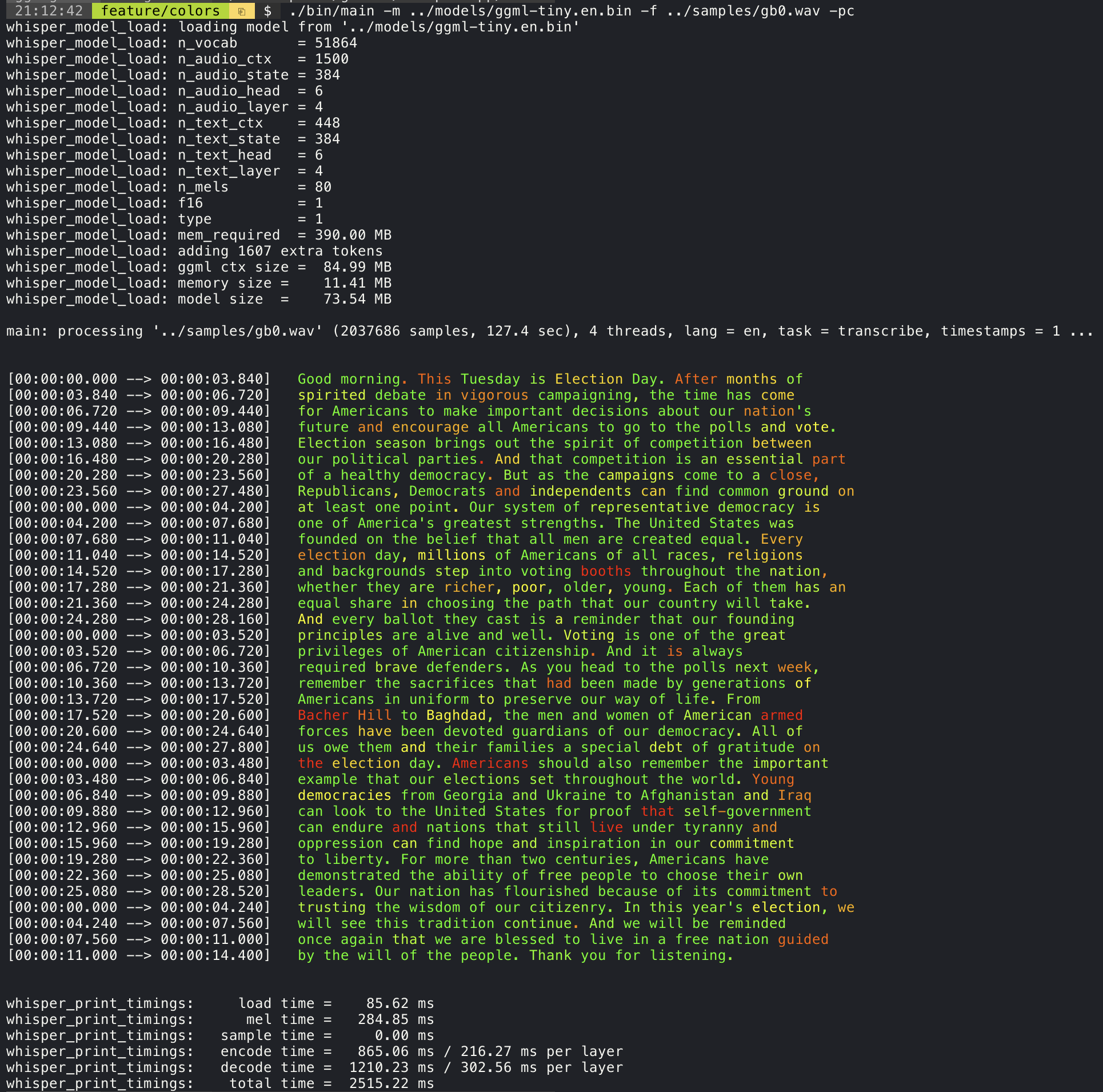
Confidence color-coding
Adding the --print-colors argument will print the transcribed text using an experimental color coding strategy
to highlight words with high or low confidence:
./build/bin/whisper-cli -m models/ggml-base.en.bin -f samples/gb0.wav --print-colors
Controlling the length of the generated text segments (experimental)
For example, to limit the line length to a maximum of 16 characters, simply add -ml 16:
$ ./build/bin/whisper-cli -m ./models/ggml-base.en.bin -f ./samples/jfk.wav -ml 16

whisper_model_load: loading model from './models/ggml-base.en.bin'
...
system_info: n_threads = 4 / 10 | AVX2 = 0 | AVX512 = 0 | NEON = 1 | FP16_VA = 1 | WASM_SIMD = 0 | BLAS = 1 |

main: processing './samples/jfk.wav' (176000 samples, 11.0 sec), 4 threads, 1 processors, lang = en, task = transcribe, timestamps = 1 ...

[00:00:00.000 --> 00:00:00.850]   And so my
[00:00:00.850 --> 00:00:01.590]   fellow
[00:00:01.590 --> 00:00:04.140]   Americans, ask
[00:00:04.140 --> 00:00:05.660]   not what your
[00:00:05.660 --> 00:00:06.840]   country can do
[00:00:06.840 --> 00:00:08.430]   for you, ask
[00:00:08.430 --> 00:00:09.440]   what you can do
[00:00:09.440 --> 00:00:10.020]   for your
[00:00:10.020 --> 00:00:11.000]   country.
Word-level timestamp (experimental)
The --max-len argument can be used to obtain word-level timestamps. Simply use -ml 1:
$ ./build/bin/whisper-cli -m ./models/ggml-base.en.bin -f ./samples/jfk.wav -ml 1

whisper_model_load: loading model from './models/ggml-base.en.bin'
...
system_info: n_threads = 4 / 10 | AVX2 = 0 | AVX512 = 0 | NEON = 1 | FP16_VA = 1 | WASM_SIMD = 0 | BLAS = 1 |

main: processing './samples/jfk.wav' (176000 samples, 11.0 sec), 4 threads, 1 processors, lang = en, task = transcribe, timestamps = 1 ...

[00:00:00.000 --> 00:00:00.320]
[00:00:00.320 --> 00:00:00.370]   And
[00:00:00.370 --> 00:00:00.690]   so
[00:00:00.690 --> 00:00:00.850]   my
[00:00:00.850 --> 00:00:01.590]   fellow
[00:00:01.590 --> 00:00:02.850]   Americans
[00:00:02.850 --> 00:00:03.300]  ,
[00:00:03.300 --> 00:00:04.140]   ask
[00:00:04.140 --> 00:00:04.990]   not
[00:00:04.990 --> 00:00:05.410]   what
[00:00:05.410 --> 00:00:05.660]   your
[00:00:05.660 --> 00:00:06.260]   country
[00:00:06.260 --> 00:00:06.600]   can
[00:00:06.600 --> 00:00:06.840]   do
[00:00:06.840 --> 00:00:07.010]   for
[00:00:07.010 --> 00:00:08.170]   you
[00:00:08.170 --> 00:00:08.190]  ,
[00:00:08.190 --> 00:00:08.430]   ask
[00:00:08.430 --> 00:00:08.910]   what
[00:00:08.910 --> 00:00:09.040]   you
[00:00:09.040 --> 00:00:09.320]   can
[00:00:09.320 --> 00:00:09.440]   do
[00:00:09.440 --> 00:00:09.760]   for
[00:00:09.760 --> 00:00:10.020]   your
[00:00:10.020 --> 00:00:10.510]   country
[00:00:10.510 --> 00:00:11.000]  .
Speaker segmentation via tinydiarize (experimental)
More information about this approach is available here: https://github.com/ggml-org/whisper.cpp/pull/1058
Sample usage:
# download a tinydiarize compatible model
./models/download-ggml-model.sh small.en-tdrz

# run as usual, adding the "-tdrz" command-line argument
./build/bin/whisper-cli -f ./samples/a13.wav -m ./models/ggml-small.en-tdrz.bin -tdrz
...
main: processing './samples/a13.wav' (480000 samples, 30.0 sec), 4 threads, 1 processors, lang = en, task = transcribe, tdrz = 1, timestamps = 1 ...
...
[00:00:00.000 --> 00:00:03.800]   Okay Houston, we've had a problem here. [SPEAKER_TURN]
[00:00:03.800 --> 00:00:06.200]   This is Houston. Say again please. [SPEAKER_TURN]
[00:00:06.200 --> 00:00:08.260]   Uh Houston we've had a problem.
[00:00:08.260 --> 00:00:11.320]   We've had a main beam up on a volt. [SPEAKER_TURN]
[00:00:11.320 --> 00:00:13.820]   Roger main beam interval. [SPEAKER_TURN]
[00:00:13.820 --> 00:00:15.100]   Uh uh [SPEAKER_TURN]
[00:00:15.100 --> 00:00:18.020]   So okay stand, by thirteen we're looking at it. [SPEAKER_TURN]
[00:00:18.020 --> 00:00:25.740]   Okay uh right now uh Houston the uh voltage is uh is looking good um.
[00:00:27.620 --> 00:00:29.940]   And we had a a pretty large bank or so.
Karaoke-style movie generation (experimental)
The whisper-cli example provides support for output of karaoke-style movies, where the
currently pronounced word is highlighted. Use the -owts argument and run the generated bash script.
This requires to have ffmpeg installed.
Here are a few "typical" examples:
./build/bin/whisper-cli -m ./models/ggml-base.en.bin -f ./samples/jfk.wav -owts
source ./samples/jfk.wav.wts
ffplay ./samples/jfk.wav.mp4
https://user-images.githubusercontent.com/1991296/199337465-dbee4b5e-9aeb-48a3-b1c6-323ac4db5b2c.mp4
./build/bin/whisper-cli -m ./models/ggml-base.en.bin -f ./samples/mm0.wav -owts
source ./samples/mm0.wav.wts
ffplay ./samples/mm0.wav.mp4
https://user-images.githubusercontent.com/1991296/199337504-cc8fd233-0cb7-4920-95f9-4227de3570aa.mp4
./build/bin/whisper-cli -m ./models/ggml-base.en.bin -f ./samples/gb0.wav -owts
source ./samples/gb0.wav.wts
ffplay ./samples/gb0.wav.mp4
https://user-images.githubusercontent.com/1991296/199337538-b7b0c7a3-2753-4a88-a0cd-f28a317987ba.mp4
Video comparison of different models
Use the scripts/bench-wts.sh script to generate a video in the following format:
./scripts/bench-wts.sh samples/jfk.wav
ffplay ./samples/jfk.wav.all.mp4
https://user-images.githubusercontent.com/1991296/223206245-2d36d903-cf8e-4f09-8c3b-eb9f9c39d6fc.mp4
Benchmarks
In order to have an objective comparison of the performance of the inference across different system configurations, use the whisper-bench tool. The tool simply runs the Encoder part of the model and prints how much time it took to execute it. The results are summarized in the following Github issue:
Additionally a script to run whisper.cpp with different models and audio files is provided bench.py.
You can run it with the following command, by default it will run against any standard model in the models folder.
python3 scripts/bench.py -f samples/jfk.wav -t 2,4,8 -p 1,2
It is written in python with the intention of being easy to modify and extend for your benchmarking use case.
It outputs a csv file with the results of the benchmarking.
ggml format
The original models are converted to a custom binary format. This allows to pack everything needed into a single file:
- model parameters
- mel filters
- vocabulary
- weights
You can download the converted models using the models/download-ggml-model.sh script or manually from here:
For more details, see the conversion script models/convert-pt-to-ggml.py or models/README.md.
Bindings
- Rust: tazz4843/whisper-rs | #310
- JavaScript: bindings/javascript | #309
- React Native (iOS / Android): whisper.rn
- Go: bindings/go | #312
- Java:
- Ruby: bindings/ruby | #507
- Objective-C / Swift: ggml-org/whisper.spm | #313
- .NET: | #422
- Python: | #9
- stlukey/whispercpp.py (Cython)
- AIWintermuteAI/whispercpp (Updated fork of aarnphm/whispercpp)
- aarnphm/whispercpp (Pybind11)
- abdeladim-s/pywhispercpp (Pybind11)
- R: bnosac/audio.whisper
- Unity: macoron/whisper.unity
XCFramework
The XCFramework is a precompiled version of the library for iOS, visionOS, tvOS, and macOS. It can be used in Swift projects without the need to compile the library from source. For example, the v1.7.5 version of the XCFramework can be used as follows:
// swift-tools-version: 5.10
// The swift-tools-version declares the minimum version of Swift required to build this package.

import PackageDescription

let package = Package(
    name: "Whisper",
    targets: [
        .executableTarget(
            name: "Whisper",
            dependencies: [
                "WhisperFramework"
            ]),
        .binaryTarget(
            name: "WhisperFramework",
            url: "https://github.com/ggml-org/whisper.cpp/releases/download/v1.7.5/whisper-v1.7.5-xcframework.zip",
            checksum: "c7faeb328620d6012e130f3d705c51a6ea6c995605f2df50f6e1ad68c59c6c4a"
        )
    ]
)
Voice Activity Detection (VAD)
Support for Voice Activity Detection (VAD) can be enabled using the --vad
argument to whisper-cli. In addition to this option a VAD model is also
required.
The way this works is that first the audio samples are passed through the VAD model which will detect speech segments. Using this information, only the speech segments that are detected are extracted from the original audio input and passed to whisper for processing. This reduces the amount of audio data that needs to be processed by whisper and can significantly speed up the transcription process.
The following VAD models are currently supported:
Silero-VAD
Silero-vad is a lightweight VAD model written in Python that is fast and accurate.
Models can be downloaded by running the following command on Linux or MacOS:
$ ./models/download-vad-model.sh silero-v6.2.0
Downloading ggml model silero-v6.2.0 from 'https://huggingface.co/ggml-org/whisper-vad' ...
ggml-silero-v6.2.0.bin        100%[==============================================>] 864.35K  --.-KB/s    in 0.04s
Done! Model 'silero-v6.2.0' saved in '/path/models/ggml-silero-v6.2.0.bin'
You can now use it like this:

  $ ./build/bin/whisper-cli -vm /path/models/ggml-silero-v6.2.0.bin --vad -f samples/jfk.wav -m models/ggml-base.en.bin
And the following command on Windows:
> .\models\download-vad-model.cmd silero-v6.2.0
Downloading vad model silero-v6.2.0...
Done! Model silero-v6.2.0 saved in C:\Users\danie\work\ai\whisper.cpp\ggml-silero-v6.2.0.bin
You can now use it like this:

C:\path\build\bin\Release\whisper-cli.exe -vm C:\path\ggml-silero-v6.2.0.bin --vad -m models/ggml-base.en.bin -f samples\jfk.wav
To see a list of all available models, run the above commands without any arguments.
This model can be also be converted manually to ggml using the following command:
$ python3 -m venv venv && source venv/bin/activate
$ (venv) pip install silero-vad
$ (venv) $ python models/convert-silero-vad-to-ggml.py --output models/silero.bin
Saving GGML Silero-VAD model to models/silero-v6.2.0-ggml.bin
And it can then be used with whisper as follows:
$ ./build/bin/whisper-cli \
   --file ./samples/jfk.wav \
   --model ./models/ggml-base.en.bin \
   --vad \
   --vad-model ./models/silero-v6.2.0-ggml.bin
VAD Options
-
--vad-threshold: Threshold probability for speech detection. A probability for a speech segment/frame above this threshold will be considered as speech.
-
--vad-min-speech-duration-ms: Minimum speech duration in milliseconds. Speech segments shorter than this value will be discarded to filter out brief noise or false positives.
-
--vad-min-silence-duration-ms: Minimum silence duration in milliseconds. Silence periods must be at least this long to end a speech segment. Shorter silence periods will be ignored and included as part of the speech.
-
--vad-max-speech-duration-s: Maximum speech duration in seconds. Speech segments longer than this will be automatically split into multiple segments at silence points exceeding 98ms to prevent excessively long segments.
-
--vad-speech-pad-ms: Speech padding in milliseconds. Adds this amount of padding before and after each detected speech segment to avoid cutting off speech edges.
-
--vad-samples-overlap: Amount of audio to extend from each speech segment into the next one, in seconds (e.g., 0.10 = 100ms overlap). This ensures speech isn't cut off abruptly between segments when they're concatenated together.
Examples
There are various examples of using the library for different projects in the examples folder. Some of the examples are even ported to run in the browser using WebAssembly. Check them out!
| Example | Web | Description |
|---|---|---|
| whisper-cli | whisper.wasm | Tool for translating and transcribing audio using Whisper |
| whisper-bench | bench.wasm | Benchmark the performance of Whisper on your machine |
| whisper-stream | stream.wasm | Real-time transcription of raw microphone capture |
| whisper-command | command.wasm | Basic voice assistant example for receiving voice commands from the mic |
| whisper-server | HTTP transcription server with OAI-like API | |
| whisper-talk-llama | Talk with a LLaMA bot | |
| whisper.objc | iOS mobile application using whisper.cpp | |
| whisper.swiftui | SwiftUI iOS / macOS application using whisper.cpp | |
| whisper.android | Android mobile application using whisper.cpp | |
| whisper.nvim | Speech-to-text plugin for Neovim | |
| generate-karaoke.sh | Helper script to easily generate a karaoke video of raw audio capture | |
| livestream.sh | Livestream audio transcription | |
| yt-wsp.sh | Download + transcribe and/or translate any VOD (original) | |
| wchess | wchess.wasm | Voice-controlled chess |
Discussions
If you have any kind of feedback about this project feel free to use the Discussions section and open a new topic.
You can use the Show and tell category
to share your own projects that use whisper.cpp. If you have a question, make sure to check the
Frequently asked questions (#126) discussion.