mirror of
https://github.com/helmfile/helmfile.git
synced 2026-10-17 20:01:04 +02:00
 Dessalines39394andDessalines39394
3122008c8c
Dessalines39394andDessalines39394
3122008c8c
The star history chart in the README is currently broken due to GitHub stargazer API restrictions. Switch the chart to a working alternative so the project's popularity remains visible.

Co-authored-by: Dessalines39394 <245616256+Dessalines39394@users.noreply.github.com>
135 lines
5.4 KiB
Markdown
135 lines
5.4 KiB
Markdown
<!-- markdownlint-configure-file {
|
||
"MD013": {
|
||
"code_blocks": false,
|
||
"tables": false
|
||
},
|
||
"MD033": false,
|
||
"MD041": false
|
||
} -->
|
||
|
||
<div align="center" markdown="1">
|
||
|
||
# Helmfile
|
||
|
||
[](https://github.com/helmfile/helmfile/actions/workflows/ci.yaml?query=branch%3Amain)
|
||
[](https://github.com/helmfile/helmfile/pkgs/container/helmfile)
|
||
[](https://goreportcard.com/report/github.com/helmfile/helmfile)
|
||
[](https://slack.sweetops.com)
|
||
[](https://helmfile.readthedocs.io/en/latest/)
|
||
[](https://gurubase.io/g/helmfile)
|
||
[](https://zread.ai/helmfile/helmfile)
|
||
|
||
声明式Helm Chart管理工具
|
||
<br />
|
||
|
||
</div>
|
||
|
||
[English](./README.md) | [简体中文]
|
||
|
||
# 关于
|
||
|
||
Helmfile 是一个声明式Helm Chart管理工具
|
||
|
||
> Helmfile 项目已经从原仓库 roboll/helmfile 转移到了 helmfile/helmfile。有关更多信息,请参见 roboll/helmfile#1824
|
||
|
||
## 特性
|
||
|
||
- 通过一个YAML集中管理集群中多个Helm Chart, 类似于Docker Compose统一管理Docker
|
||
- 对Helm Chart根据部署环境区分管理
|
||
- Helm Chart版本控制,比如指定版本范围、锁定某一版本
|
||
- 快速识别 Kubernetes 集群内已经部署应用与新更改之间的差异
|
||
- Helmfile支持Go Templates语法定义Helm Chart
|
||
- 在部署阶段支持配置hook,可以执行脚本等,实现变量远程获取,报错清理,成功提醒等
|
||
|
||
|
||
## 安装
|
||
|
||
**方式1: 二进制安装**
|
||
|
||
下载 [releases](https://github.com/helmfile/helmfile/releases)
|
||
|
||
**方式2: 包管理工具**
|
||
|
||
* Archlinux: `pacman -S helmfile`
|
||
* openSUSE: `zypper in helmfile`
|
||
* Windows: ([scoop](https://scoop.sh/)): `scoop install helmfile`
|
||
* macOS ([homebrew](https://brew.sh/)): `brew install helmfile`
|
||
|
||
**方式3: 容器**
|
||
|
||
详细见:[run as a container](https://helmfile.readthedocs.io/en/latest/#running-as-a-container)
|
||
|
||
> 安装后请运行一次 `helmfile init`。 检查[helm-diff](https://github.com/databus23/helm-diff) 等插件安装正确。
|
||
|
||
**方式4: 源码安装**
|
||
|
||
依赖: [Go](https://golang.org/dl/)
|
||
|
||
|
||
|
||
` go install github.com/helmfile/helmfile@latest `
|
||
## 使用
|
||
|
||
让我们从最简单的 helmfile 开始,逐渐改进它以适应您的用例!
|
||
|
||
使用脚手架命令生成具有最佳实践目录结构的项目:
|
||
|
||
```console
|
||
helmfile create my-project && cd my-project
|
||
```
|
||
|
||
或者手动创建 `helmfile.yaml`。假设表示您 helm releases 的期望状态的 helmfile.yaml 看起来像这样:
|
||
|
||
```yaml
|
||
repositories:
|
||
- name: prometheus-community
|
||
url: https://prometheus-community.github.io/helm-charts
|
||
|
||
releases:
|
||
- name: prom-norbac-ubuntu
|
||
namespace: prometheus
|
||
chart: prometheus-community/prometheus
|
||
set:
|
||
- name: rbac.create
|
||
value: false
|
||
```
|
||
|
||
通过运行来同步您的Kubernetes集群状态到期望状态:
|
||
|
||
```console
|
||
helmfile apply
|
||
```
|
||
|
||
恭喜!您现在已经在集群内部运行了第一个Prometheus部署。
|
||
|
||
|
||
## 文档
|
||
|
||
[Documentation](https://helmfile.readthedocs.io/)
|
||
|
||
|
||
## 参与贡献
|
||
|
||
欢迎贡献! 让我们一起使helmfile变得更好:[贡献指南](https://helmfile.readthedocs.io/en/latest/contributing/)
|
||
|
||
|
||
## 使用者
|
||
|
||
Helmfile 已经被许多用户在生产环境中使用:
|
||
|
||
* [gitlab.com](https://gitlab.com)
|
||
* [reddit.com](https://reddit.com)
|
||
* [Jenkins](https://jenkins.io)
|
||
* ...
|
||
|
||
更多用户请参见: [Users](https://helmfile.readthedocs.io/en/latest/users/)
|
||
|
||
|
||
## License
|
||
|
||
[MIT](https://github.com/helmfile/helmfile/blob/main/LICENSE)
|
||
|
||
## Star History
|
||
|
||
[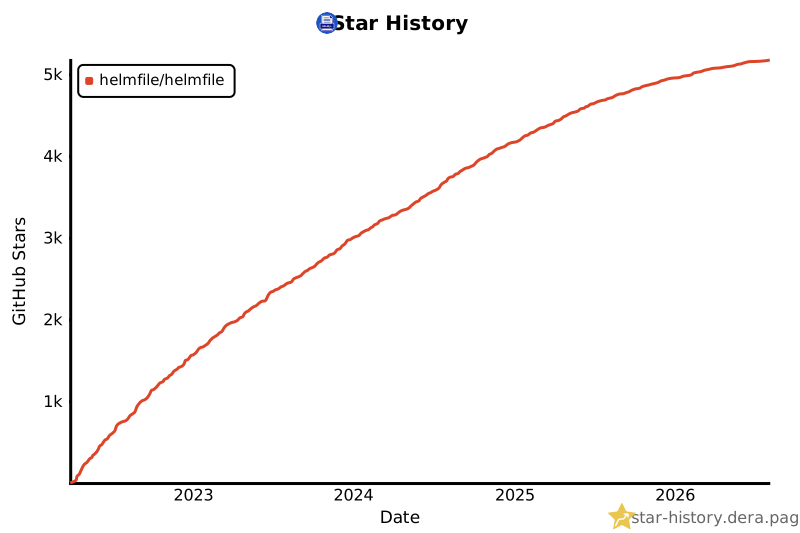](https://star-history.dera.page/#helmfile/helmfile&Date)
|