 72e57ec4e7
The variant fallback in getHighPerfCpuCountByVariant() used countKeepingMin() while the primary frequency branch used countDroppingMin(). Both branches are meant to return the count of high-performance cores, so the asymmetry caused the variant branch to return the LITTLE cluster count instead. On big.LITTLE SoCs, when cpuinfo_max_freq is unreadable and the code falls back to CPU variant (verified by the reporter on Helio G85 in ggml-org/whisper.cpp#3602), whisper ends up running on the LITTLE cores and inference throughput roughly halves. Fix mirrors the suggestion in the issue: use countDroppingMin() in the variant branch, matching the frequency branch. Both the Kotlin (whisper.android) and Java (whisper.android.java) examples share the same asymmetry and are fixed together. |
||
|---|---|---|
| .. | ||
| README_files | ||
| app | ||
| gradle/wrapper | ||
| .gitignore | ||
| README.md | ||
| build.gradle | ||
| gradle.properties | ||
| gradlew | ||
| gradlew.bat | ||
| settings.gradle | ||
README.md
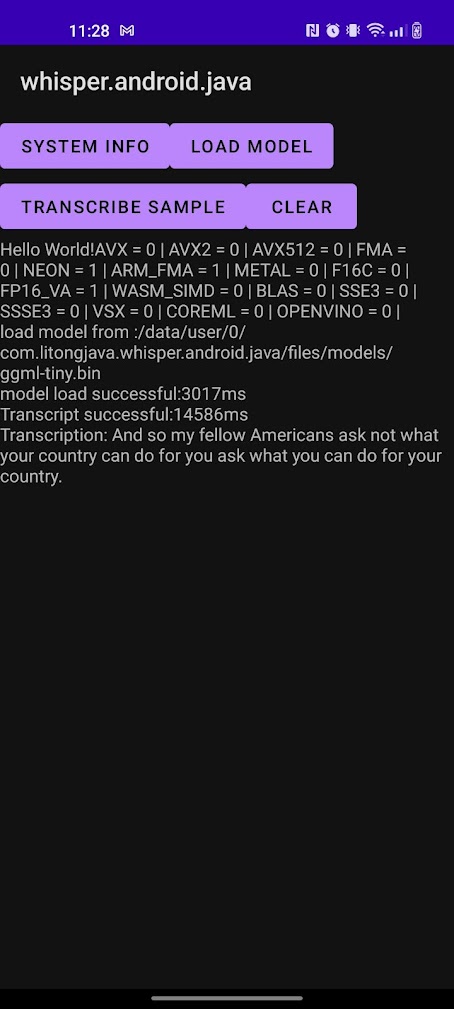
A sample Android app using java code and whisper.cpp to do voice-to-text transcriptions.
To use:
- Select a model from the whisper.cpp repository.1
- Copy the model to the "app/src/main/assets/models" folder.
- Select a sample audio file (for example, jfk.wav).
- Copy the sample to the "app/src/main/assets/samples" folder.
- Modify the modelFilePath in the WhisperService.java
- Modify the sampleFilePath in the WhisperService.java
- Select the "release" active build variant, and use Android Studio to run and deploy to your device.
PS:
- Do not move this android project folder individually to other folders, because this android project folder depends on the files of the whole project.
- The cpp code is compiled during the build process
- If you want to import a compiled cpp project in your Android project, please refer to the https://github.com/litongjava/whisper.cpp.android.java.demo
-
I recommend the tiny or base models for running on an Android device. ↩︎