 Naco SirenandHan Yin
00108bb713
Naco SirenandHan Yin
00108bb713
* UI: implement basic UI components

* util: implement performance monitor; wrap it with a viewmodel

* util: implement user preferences utility

* UI: implement core flow's screens

* UI: add a new MainActivity; update manifest

* [WIP] DI: implement simple local vm factory provider

* UI: disable triggering drawer via gesture; enable alert dialog on back navigation inside conversation and benchmark

* UI: allow drawer's gesture control only on Home and Settings screens; enable alert dialog on back navigation inside conversation and benchmark

* UI: split a nested parent settings screen into separate child settings screens

* UI: polish system prompt setup UI

* Deps: bump Kotlin plugin; introduce KSP; apply in :app subproject

* DB: setup Room database

* data: introduce repo for System Prompt; flow data from Room to VM

* bugfix: properly handle user's quitting conversation screen while tokens in generation

* UI: rename `ModeSelection` to `ModelLoading` for better clarity

* UI: update app name to be more Arm

* UI: polish conversation screen

* data: code polish

* UI: code polish

* bugfix: handle user quitting on model loading

* UI: locks user in alert dialog when model is unloading

* vm: replace token metrics stubs with actual implementation

* UI: refactor top app bars

* nit: combine temperatureMetrics and useFahrenheit

* DI: introduce Hilt plugin + processor + lib dependencies

* DI: make app Hilt injectable

* DI: make viewmodels Hilt injectable

* DI: replace manual DI with Hilt DI

* UI: optimize AppContent's composing

* bugfix: wait for model to load before navigating to benchmark screen; use NavigationActions instead of raw navController

* UI: navigation with more natural animated transitions

* DI: Optimize AppModule

* Feature: Introduce ModelRepository and ModelsManagementViewModel; update AppModule

* UI: polish UI for ModelsManagementScreen; inject ModelsManagementVieModel

* DI: abstract the protocol of SystemPromptRepository; update AppModule

* data: [WIP] prepare for ModelRepository refactor & impl

* data: introduce Model entity and DAO; update DI module

* UI: replace Models Management screen's stubbing with instrumentation

* UI: polish sort order menu

* data: import local model with file picker

* bugfix: use List instead of Collection for ModelDao's deletion

* data: add a util file for extracting file name & size and model metadata

* UI: enrich ModelManagementState; extract filename to show correct importing UI

* UI: implement multiple models deletion; update Models Management screen

* UI: handle back navigation when user is in multi-selection mode

* util: extract file size formatting into ModelUtils

* UI: add a confirmation step when user picks a file; refactor model import overlay into AlertDialog

* UI: extract a shared ModelCard component

* UI: replace model selection screen's data stubbing; add empty view

* nit: tidy SystemPromptViewModel

* Util: split FileUtils from ModelUtils; extract copy methods into FileUtils

* data: pass through getModelById from ModelDao into ModelRepository

* core: extract conversation and benchmark logics into InferenceManager; add logs and missing state updates in stub InferenceEngine

* vm: split mono MainViewModel into separate individual ViewModels

* vm: merge SystemPromptViewModel into ModelLoadingViewModel

* core: break down InferenceManager due to Interface Segregation Principle

* UI: show model card in Model Loading screen

* UI: show model card in Conversation screen

* UI: unify Model Card components

* core: swap in LLamaAndroid and mark stub engine for testing only

* data: allow canceling the ongoing model import

* UI: update UI ongoing model import's cancellation

* LLama: update engine state after handling the cancellation of sendUserPrompt

* VM: handle the cancellation of ongoing token generation

* LLama: refactor loadModel by splitting the system prompt setting into a separate method

* feature: check for available space before copying local model

* UI: centralize the AppScaffold and modularize its configs

* UI: refactor BottomBarConfig.ModelsManagement APIs

* UI: combine TopBarConfig and BottomBarConfig into each route's ScaffoldConfig

* UI: replace ugly optional as casts in AppScaffold with extension functions

* UI: fix the typo `totalGb` in `StorageMetrics`

* UI: remove code duplication in sort menu

* LLama: add ModelUnloadingState to engine State; add missing state checks in stub engine; fix instrumentation engine's error messages

* UI: refactor back handling by removing centralized BackHandlerSetup and UnloadModelConfirmationDialog from AppContent

* UI: implement BenchmarkScreen's individual back handling

* LLama: add a new Initializing state; ; add two extension properties; rename LibraryLoaded state to Initialized

* UI: Introduce an abstract ViewModel to handle additional model unloading logics

* UI: expose a single facade ModelUnloadDialogHandler; move UnloadModelState into ModelUnloadingViewModel.kt

* UI: migrate ModelLoadingScreen onto ModelLoadingViewModel; update & refine ModelLoadingScreen

* UI: migrate ConversationViewModel onto ModelLoadingViewModel; update & refine ConversationScreen

* nit: extract app name into a constant value; remove unused onBackPressed callbacks

* UI: update AppContent to pass in correct navigation callbacks

* nit: polish ModelLoadingScreen UI

* core: throw Exception instead of returning null if model fails to load

* navigation: sink model loading state management from AppContent down into ModelLoadingScreen; pass ModelLoadingMetrics to Benchmark and Conversation screens

* gguf: add GGUF metadata data holder and its corresponding extractor implementation

* DB: introduce Kotlin serialization extension's library and plugin; add Room runtime library

* GGUF: make GgufMetadata serializable in order to be compatible with Room

* nit: refactor data.local package structure

* nit: rename lastUsed field to dateLastUsed; add dateAdded field

* UI: refactor ModelCard UI to show GGUF metadata

* UI: update ModelSelectionScreen with a preselect mechanism

* UI: polish model card

* nit: allow deselect model on Model Selection screen

* nit: revert accidental committing of debug code

* UI: polish ModelLoading screen

* util: extract formatting helper functions from FileUtils into a new FormatUtils

* UI: polish model cards on Benchmark and Conversation screens to show model loading metrics

* UI: show a Snack bar to warn user that system prompt is not always supported

* UI: handle back press on Model Selection screen

* UI: finally support theme modes; remove hardcoded color schemes, default to dynamic color scheme implementation

* feature: support searching on Model Selection screen

* nit: move scaffold related UI components into a separate package

* UI: extract InfoView out into a separate file for reusability

* data: move Model related actions (query, filter, sort) into ModelInfo file

* UI: animate FAB on model preselection states

* feature: support filtering in Model Management screen

* ui: show empty models info in Model Management screen

* ui: add filter off icon to "Clear filters" menu item

* [WIP] ui: polish Benchmark screen; implement its bottom app bar

* ui: polish Benchmark screen; implement its bottom app bar's rerun and share

* nit: disable mode selection's radio buttons when loading model

* feature: implement Conversation screen's bottom app bar

* pkg: restructure BottomAppBars into separate files in a child package

* pkg: restructure TopBarApps into separate files in a child package

* pkg: restructure system metrics into a separate file

* UI: polish Conversation screen

* data: update system prompt presets

* UI: allow hide or show model card on Conversation & Benchmark screens; fix message arrangement

* data: update & enhance system prompt presets

* deps: introduce Retrofit2

* data: implement HuggingFace data model, data source with Retrofit API

* data: update Model data repository to support fetching HuggingFace models

* [WIP] UI: replace the HuggingFace stub in Model Management screen with actual API call

* UI: map language codes into country Emojis

* ui: add "clear results" action to Benchmark screen

* nit: print current pp & tg in llama-bench

* UI: disable landscape mode; prevent duplicated benchmark running

* llama: migrate C/CXX flags into CMakeList

* [WIP] llama: ABI split builds five .so artifacts.

However, all .so are performing on SVE level

* [WIP] llama: ABI split where five tiers are built sequentially.

* [WIP] llama: disable OpenMP in ABI split since most SoCs are big.LITTLE

* [WIP] llama: enable KleidiAI and disable tier 4 due to `+sve+sve2` bug caused by `ggml_add_cpu_backend_variant_impl` as explained below

```CMake
if (NOT SME_ENABLED MATCHES -1)
...
    set(PRIVATE_ARCH_FLAGS "-fno-tree-vectorize;${PRIVATE_ARCH_FLAGS}+sve+sve2")
...
```

* core: add Google's cpu_features as a submodule

* core: implement cpu_detector native lib

* core: swap out hardcoded LlamaAndroid library loading

* core: add back OpenMP due to huge perf loss on TG128

* misc: reorg the pkg structure

* misc: rename LlamaAndroid related class to InferenceEngine prefixes

* [WIP] lib: move GgufMetadata into the lib submodule

* lib: expose GgufMetadataReader as interface only

* lib: replace the naive & plain SharedPreferences with DataStore implementation

* lib: hide the internal implementations, only expose a facade and interfaces

* lib: expose Arm features

* di: add a stub TierDetection; provide both actual impl and stub in AppModule

* UI: add visualizer UI for Arm features

* misc: UI polish

* lib: refactored InferenceEngineLoader; added a `NONE` Llama Tier

* UI: support `NONE` Llama Tier in general settings

* lib: optimize engine loader; always perform a fresh detection when cache is null

* remote: add HuggingFaceModelDetails data class

* remote: refine HuggingFaceModel data class

* nit: remove `trendingScore` field from HuggingFace model entities, weird...

* remote: refactor HuggingFaceApiService; implement download feature in HuggingFaceRemoteDataSource

* remote: fix the incorrect parse of HuggingFace's inconsistent & weird JSON response

* UI: scaffold Models Management screen and view model

* UI: implement a dialog UI to show fetched HuggingFace models.

* UI: use a broadcast receiver to listen for download complete events and show local import dialog.

* data: handle network exceptions elegantly

* pkg: restructure `data`'s packages

* data: extract local file info, copy and cleanup logics into LocalFileDataSource

* nit: minor UI patch; add missing comments

* bugfix: tapping "Home" in navigation drawer should simply close it without any navigation action.

* UI: improve autoscroll during token generation

* lib: tested on JFrog Artifactory for Maven publishing

* UI: show RAM warning if model too large

* UI: polish model management screen's error dialog

* util: add more items into the mapping table of ISO 639-1 language code to ISO 3166-1 country code

* llm: properly propagate error to UI upon failing to load selected model

* UI: avoid duplicated calculation of token metrics

* lib: read & validate the magic number from the picked source file before executing the import

* UI: add "Learn More" hyperlinks to Error dialog upon model import failures

* lib: refactor the GgufMetadataReader to take  InputStream instead of absolute path as argument

* lib: fix the `SIMD` typo in Tier description

* core: verify model file path is readable

* lib: add UnsupportedArchitectureException for triaged error message

* util: split FormatUtils into multiple utils for better readability

* UI: change benchmark screen from raw markdown to table view

* bugfix: reset preselection upon running the preselected model

* misc: linter issue

* bugfix: fix the malfunctioning monitoring switch

* UI: update Arm features indicator; fix the broken hyperlinks

* UI: add quick action buttons to benchmark screen's result card

* UI: hide share fab after clearing all benchmark results

* UI: fix the model unload dialog message; elevate the model card and hide it by default on Conversation screen;

* UI: hide the stubbing actions in Conversation screen

* UI: add show/hide stats control to conversation screen's assistant message bubble; fix placeholder

* UI: add a info button to explain token metrics

* misc: remove the redundant `Companion` added due to refactoring

* UI: show corresponding system metrics detailed info upon tapping RAM / storage / temperature indicator

* UI: add info button to System Prompt switch; expand the model card by default

* UI: disable tag & language chips; add section headers to explain what they are

* misc: replace top bar indicator's spacer with padding

* UI: merge the Model Selection and Model Management into a unified Models screen

* UI: split the ModelsManagementViewModel from a unified ModelsViewModel due to huge complexity

* UI: add model loading in progress view; polish the empty model info view

* UI: polish the bottom bars and info view when no models found; show loading in progress while fetching models

* build: [BREAKING] bump the versions of libraries and plugins

* UI: fix the breaking build

* UI: add Tooltip on Import FAB for user onboarding

* UI: adds AppPreferences to track user onboarding status

* UI: tracks user's first success on importing a model

* data: add hand crafted rules to filter the models fetched from HuggingFace API

* UI: update app name & about; polish top bars' indicators & buttons

* UI: polish Hugging Face download dialog UI

* UX: implement onboarding tooltips for model import and onboarding

* misc: use sentence case for CTA button labels

* [WIP] UI: add Arm color palette from Philip.Watson3

* UI: address Rojin's UX feedbacks

* UI: address Rojin's UX feedbacks - part 2

* UI: update Arm color palette from Philip.Watson3

* data: make sure fetch preselected models in the same order of their IDs

* UI: fix UI issues in the generic settings screen and navigation drawer

* nit: address Rojin's feedbacks on model import message again

* nit: append `®` to all `Arm` labels

* UI: extract a reusable InfoAlertDialog

* core: support GGML_CPU_ALL_VARIANTS on Android!

* core: restructure Kleidi-Llama library

* core: organizing cmake arguments

* data: sort preselected models according to device's available RAM

* app: update adaptive + themed + legacy icons and app name

* UI: fix the font size auto scaling for ArmFeaturesVisualizer

* core: further improve the performance on native methods

* UI: minor color palette changes; emphasize the bottom bar FABs; fix Settings Screen menu item label

* UI: make more room for assistant message bubble's width

* UI: better usage of tertiary colors to highlight model cards but not for warnings

* UI: fix the layout issue on large font sizes

* lib: support x86-64 by dynamically set Arm related definitions

* lib: replace the factory pattern for  deprecated tiered lib loading with single instance pattern

* llama: update the library name in JNI and CMake project

* llama: update the library's package name and namespace

* llama: update the app's package name and namespace

* app: bump ksp version

* app: remove deprecated SystemUIController from accompanist by migrating to EdgeToEdge

* app: extract AppContent from MainActivity to a separate file in ui package

* lib: add File version for GGUF Magic number verification

* lib: perform engine state check inclusively instead of exclusively

* lib: change `LlamaTier` to `ArmCpuTier`

* lib: remove kleidi-llama related namings

* cleanup: remove Arm AI Chat/Playground app source code; replace with the basic sample app from https://github.com/hanyin-arm/Arm-AI-Chat-Sample

Note: the full Google Play version of AI Chat app will be open will be open sourced in another repo soon, therefore didn't go through the trouble of pruning the history using `git filter-repo` here.

* [WIP] doc: update main and Android README docs; add self to code owners

* lib: revert System.load back to System.loadLibrary

* jni: introduce a logging util to filter different logging levels on different build types

* lib: enable app optimization

* doc: replace stub Google Play app URL with the actual link add screenshots; add my GitHub ID to maintainer list

* Remove cpu_features

* Fix linters issues in editorconfig-checker job

https://github.com/ggml-org/llama.cpp/actions/runs/19548770247/job/55974800633?pr=17413

* Remove unnecessary Android CMake flag

* purge include/cpu_features directory

---------

Co-authored-by: Han Yin <han.yin@arm.com>
whisper.cpp


High-performance inference of OpenAI's Whisper automatic speech recognition (ASR) model:
- Plain C/C++ implementation without dependencies
- Apple Silicon first-class citizen - optimized via ARM NEON, Accelerate framework, Metal and Core ML
- AVX intrinsics support for x86 architectures
- VSX intrinsics support for POWER architectures
- Mixed F16 / F32 precision
- Integer quantization support
- Zero memory allocations at runtime
- Vulkan support
- Support for CPU-only inference
- Efficient GPU support for NVIDIA
- OpenVINO Support
- Ascend NPU Support
- Moore Threads GPU Support
- C-style API
- Voice Activity Detection (VAD)
Supported platforms:
- Mac OS (Intel and Arm)
- iOS
- Android
- Java
- Linux / FreeBSD
- WebAssembly
- Windows (MSVC and MinGW)
- Raspberry Pi
- Docker
The entire high-level implementation of the model is contained in whisper.h and whisper.cpp.
The rest of the code is part of the ggml machine learning library.
Having such a lightweight implementation of the model allows to easily integrate it in different platforms and applications. As an example, here is a video of running the model on an iPhone 13 device - fully offline, on-device: whisper.objc
https://user-images.githubusercontent.com/1991296/197385372-962a6dea-bca1-4d50-bf96-1d8c27b98c81.mp4
You can also easily make your own offline voice assistant application: command
https://user-images.githubusercontent.com/1991296/204038393-2f846eae-c255-4099-a76d-5735c25c49da.mp4
On Apple Silicon, the inference runs fully on the GPU via Metal:
https://github.com/ggml-org/whisper.cpp/assets/1991296/c82e8f86-60dc-49f2-b048-d2fdbd6b5225
Quick start
First clone the repository:
git clone https://github.com/ggml-org/whisper.cpp.git
Navigate into the directory:
cd whisper.cpp
Then, download one of the Whisper models converted in ggml format. For example:
sh ./models/download-ggml-model.sh base.en
Now build the whisper-cli example and transcribe an audio file like this:
# build the project
cmake -B build
cmake --build build -j --config Release

# transcribe an audio file
./build/bin/whisper-cli -f samples/jfk.wav
For a quick demo, simply run make base.en.
The command downloads the base.en model converted to custom ggml format and runs the inference on all .wav samples in the folder samples.
For detailed usage instructions, run: ./build/bin/whisper-cli -h
Note that the whisper-cli example currently runs only with 16-bit WAV files, so make sure to convert your input before running the tool.
For example, you can use ffmpeg like this:
ffmpeg -i input.mp3 -ar 16000 -ac 1 -c:a pcm_s16le output.wav
More audio samples
If you want some extra audio samples to play with, simply run:
make -j samples
This will download a few more audio files from Wikipedia and convert them to 16-bit WAV format via ffmpeg.
You can download and run the other models as follows:
make -j tiny.en
make -j tiny
make -j base.en
make -j base
make -j small.en
make -j small
make -j medium.en
make -j medium
make -j large-v1
make -j large-v2
make -j large-v3
make -j large-v3-turbo
Memory usage
| Model | Disk | Mem |
|---|---|---|
| tiny | 75 MiB | ~273 MB |
| base | 142 MiB | ~388 MB |
| small | 466 MiB | ~852 MB |
| medium | 1.5 GiB | ~2.1 GB |
| large | 2.9 GiB | ~3.9 GB |
POWER VSX Intrinsics
whisper.cpp supports POWER architectures and includes code which
significantly speeds operation on Linux running on POWER9/10, making it
capable of faster-than-realtime transcription on underclocked Raptor
Talos II. Ensure you have a BLAS package installed, and replace the
standard cmake setup with:
# build with GGML_BLAS defined
cmake -B build -DGGML_BLAS=1
cmake --build build -j --config Release
./build/bin/whisper-cli [ .. etc .. ]
Quantization
whisper.cpp supports integer quantization of the Whisper ggml models.
Quantized models require less memory and disk space and depending on the hardware can be processed more efficiently.
Here are the steps for creating and using a quantized model:
# quantize a model with Q5_0 method
cmake -B build
cmake --build build -j --config Release
./build/bin/quantize models/ggml-base.en.bin models/ggml-base.en-q5_0.bin q5_0

# run the examples as usual, specifying the quantized model file
./build/bin/whisper-cli -m models/ggml-base.en-q5_0.bin ./samples/gb0.wav
Core ML support
On Apple Silicon devices, the Encoder inference can be executed on the Apple Neural Engine (ANE) via Core ML. This can result in significant
speed-up - more than x3 faster compared with CPU-only execution. Here are the instructions for generating a Core ML model and using it with whisper.cpp:
-
Install Python dependencies needed for the creation of the Core ML model:
pip install ane_transformers pip install openai-whisper pip install coremltools- To ensure
coremltoolsoperates correctly, please confirm that Xcode is installed and executexcode-select --installto install the command-line tools. - Python 3.11 is recommended.
- MacOS Sonoma (version 14) or newer is recommended, as older versions of MacOS might experience issues with transcription hallucination.
- [OPTIONAL] It is recommended to utilize a Python version management system, such as Miniconda for this step:
- To create an environment, use:
conda create -n py311-whisper python=3.11 -y - To activate the environment, use:
conda activate py311-whisper
- To create an environment, use:
- To ensure
-
Generate a Core ML model. For example, to generate a
base.enmodel, use:./models/generate-coreml-model.sh base.enThis will generate the folder
models/ggml-base.en-encoder.mlmodelc -
Build
whisper.cppwith Core ML support:# using CMake cmake -B build -DWHISPER_COREML=1 cmake --build build -j --config Release -
Run the examples as usual. For example:
$ ./build/bin/whisper-cli -m models/ggml-base.en.bin -f samples/jfk.wav

...

whisper_init_state: loading Core ML model from 'models/ggml-base.en-encoder.mlmodelc'
whisper_init_state: first run on a device may take a while ...
whisper_init_state: Core ML model loaded

system_info: n_threads = 4 / 10 | AVX = 0 | AVX2 = 0 | AVX512 = 0 | FMA = 0 | NEON = 1 | ARM_FMA = 1 | F16C = 0 | FP16_VA = 1 | WASM_SIMD = 0 | BLAS = 1 | SSE3 = 0 | VSX = 0 | COREML = 1 |

...
The first run on a device is slow, since the ANE service compiles the Core ML model to some device-specific format. Next runs are faster.
For more information about the Core ML implementation please refer to PR #566.
OpenVINO support
On platforms that support OpenVINO, the Encoder inference can be executed on OpenVINO-supported devices including x86 CPUs and Intel GPUs (integrated & discrete).
This can result in significant speedup in encoder performance. Here are the instructions for generating the OpenVINO model and using it with whisper.cpp:
-
First, setup python virtual env. and install python dependencies. Python 3.10 is recommended.
Windows:
cd models
python -m venv openvino_conv_env
openvino_conv_env\Scripts\activate
python -m pip install --upgrade pip
pip install -r requirements-openvino.txt
Linux and macOS:
cd models python3 -m venv openvino_conv_env source openvino_conv_env/bin/activate python -m pip install --upgrade pip pip install -r requirements-openvino.txt -
Generate an OpenVINO encoder model. For example, to generate a
base.enmodel, use:python convert-whisper-to-openvino.py --model base.enThis will produce ggml-base.en-encoder-openvino.xml/.bin IR model files. It's recommended to relocate these to the same folder as
ggmlmodels, as that is the default location that the OpenVINO extension will search at runtime. -
Build
whisper.cppwith OpenVINO support:Download OpenVINO package from release page. The recommended version to use is 2024.6.0. Ready to use Binaries of the required libraries can be found in the OpenVino Archives
After downloading & extracting package onto your development system, set up required environment by sourcing setupvars script. For example:
Linux:
source /path/to/l_openvino_toolkit_ubuntu22_2023.0.0.10926.b4452d56304_x86_64/setupvars.shWindows (cmd):
C:\Path\To\w_openvino_toolkit_windows_2023.0.0.10926.b4452d56304_x86_64\setupvars.batAnd then build the project using cmake:
cmake -B build -DWHISPER_OPENVINO=1 cmake --build build -j --config Release -
Run the examples as usual. For example:
$ ./build/bin/whisper-cli -m models/ggml-base.en.bin -f samples/jfk.wav

...

whisper_ctx_init_openvino_encoder: loading OpenVINO model from 'models/ggml-base.en-encoder-openvino.xml'
whisper_ctx_init_openvino_encoder: first run on a device may take a while ...
whisper_openvino_init: path_model = models/ggml-base.en-encoder-openvino.xml, device = GPU, cache_dir = models/ggml-base.en-encoder-openvino-cache
whisper_ctx_init_openvino_encoder: OpenVINO model loaded

system_info: n_threads = 4 / 8 | AVX = 1 | AVX2 = 1 | AVX512 = 0 | FMA = 1 | NEON = 0 | ARM_FMA = 0 | F16C = 1 | FP16_VA = 0 | WASM_SIMD = 0 | BLAS = 0 | SSE3 = 1 | VSX = 0 | COREML = 0 | OPENVINO = 1 |

...
The first time run on an OpenVINO device is slow, since the OpenVINO framework will compile the IR (Intermediate Representation) model to a device-specific 'blob'. This device-specific blob will get cached for the next run.
For more information about the OpenVINO implementation please refer to PR #1037.
NVIDIA GPU support
With NVIDIA cards the processing of the models is done efficiently on the GPU via cuBLAS and custom CUDA kernels.
First, make sure you have installed cuda: https://developer.nvidia.com/cuda-downloads
Now build whisper.cpp with CUDA support:
cmake -B build -DGGML_CUDA=1
cmake --build build -j --config Release
or for newer NVIDIA GPU's (RTX 5000 series):
cmake -B build -DGGML_CUDA=1 -DCMAKE_CUDA_ARCHITECTURES="86"
cmake --build build -j --config Release
Vulkan GPU support
Cross-vendor solution which allows you to accelerate workload on your GPU. First, make sure your graphics card driver provides support for Vulkan API.
Now build whisper.cpp with Vulkan support:
cmake -B build -DGGML_VULKAN=1
cmake --build build -j --config Release
BLAS CPU support via OpenBLAS
Encoder processing can be accelerated on the CPU via OpenBLAS.
First, make sure you have installed openblas: https://www.openblas.net/
Now build whisper.cpp with OpenBLAS support:
cmake -B build -DGGML_BLAS=1
cmake --build build -j --config Release
Ascend NPU support
Ascend NPU provides inference acceleration via CANN and AI cores.
First, check if your Ascend NPU device is supported:
Verified devices
| Ascend NPU | Status |
|---|---|
| Atlas 300T A2 | Support |
| Atlas 300I Duo | Support |
Then, make sure you have installed CANN toolkit . The lasted version of CANN is recommanded.
Now build whisper.cpp with CANN support:
cmake -B build -DGGML_CANN=1
cmake --build build -j --config Release
Run the inference examples as usual, for example:
./build/bin/whisper-cli -f samples/jfk.wav -m models/ggml-base.en.bin -t 8
Notes:
- If you have trouble with Ascend NPU device, please create a issue with [CANN] prefix/tag.
- If you run successfully with your Ascend NPU device, please help update the table
Verified devices.
Moore Threads GPU support
With Moore Threads cards the processing of the models is done efficiently on the GPU via muBLAS and custom MUSA kernels.
First, make sure you have installed MUSA SDK rc4.2.0: https://developer.mthreads.com/sdk/download/musa?equipment=&os=&driverVersion=&version=4.2.0
Now build whisper.cpp with MUSA support:
cmake -B build -DGGML_MUSA=1
cmake --build build -j --config Release
or specify the architecture for your Moore Threads GPU. For example, if you have a MTT S80 GPU, you can specify the architecture as follows:
cmake -B build -DGGML_MUSA=1 -DMUSA_ARCHITECTURES="21"
cmake --build build -j --config Release
FFmpeg support (Linux only)
If you want to support more audio formats (such as Opus and AAC), you can turn on the WHISPER_FFMPEG build flag to enable FFmpeg integration.
First, you need to install required libraries:
# Debian/Ubuntu
sudo apt install libavcodec-dev libavformat-dev libavutil-dev

# RHEL/Fedora
sudo dnf install libavcodec-free-devel libavformat-free-devel libavutil-free-devel
Then you can build the project as follows:
cmake -B build -D WHISPER_FFMPEG=yes
cmake --build build
Run the following example to confirm it's working:
# Convert an audio file to Opus format
ffmpeg -i samples/jfk.wav jfk.opus

# Transcribe the audio file
./build/bin/whisper-cli --model models/ggml-base.en.bin --file jfk.opus
Docker
Prerequisites
- Docker must be installed and running on your system.
- Create a folder to store big models & intermediate files (ex. /whisper/models)
Images
We have two Docker images available for this project:
ghcr.io/ggml-org/whisper.cpp:main: This image includes the main executable file as well ascurlandffmpeg. (platforms:linux/amd64,linux/arm64)ghcr.io/ggml-org/whisper.cpp:main-cuda: Same asmainbut compiled with CUDA support. (platforms:linux/amd64)ghcr.io/ggml-org/whisper.cpp:main-musa: Same asmainbut compiled with MUSA support. (platforms:linux/amd64)
Usage
# download model and persist it in a local folder
docker run -it --rm \
  -v path/to/models:/models \
  whisper.cpp:main "./models/download-ggml-model.sh base /models"
# transcribe an audio file
docker run -it --rm \
  -v path/to/models:/models \
  -v path/to/audios:/audios \
  whisper.cpp:main "whisper-cli -m /models/ggml-base.bin -f /audios/jfk.wav"
# transcribe an audio file in samples folder
docker run -it --rm \
  -v path/to/models:/models \
  whisper.cpp:main "whisper-cli -m /models/ggml-base.bin -f ./samples/jfk.wav"
Installing with Conan
You can install pre-built binaries for whisper.cpp or build it from source using Conan. Use the following command:
conan install --requires="whisper-cpp/[*]" --build=missing
For detailed instructions on how to use Conan, please refer to the Conan documentation.
Limitations
- Inference only
Real-time audio input example
This is a naive example of performing real-time inference on audio from your microphone. The stream tool samples the audio every half a second and runs the transcription continuously. More info is available in issue #10. You will need to have sdl2 installed for it to work properly.
cmake -B build -DWHISPER_SDL2=ON
cmake --build build -j --config Release
./build/bin/whisper-stream -m ./models/ggml-base.en.bin -t 8 --step 500 --length 5000
https://user-images.githubusercontent.com/1991296/194935793-76afede7-cfa8-48d8-a80f-28ba83be7d09.mp4
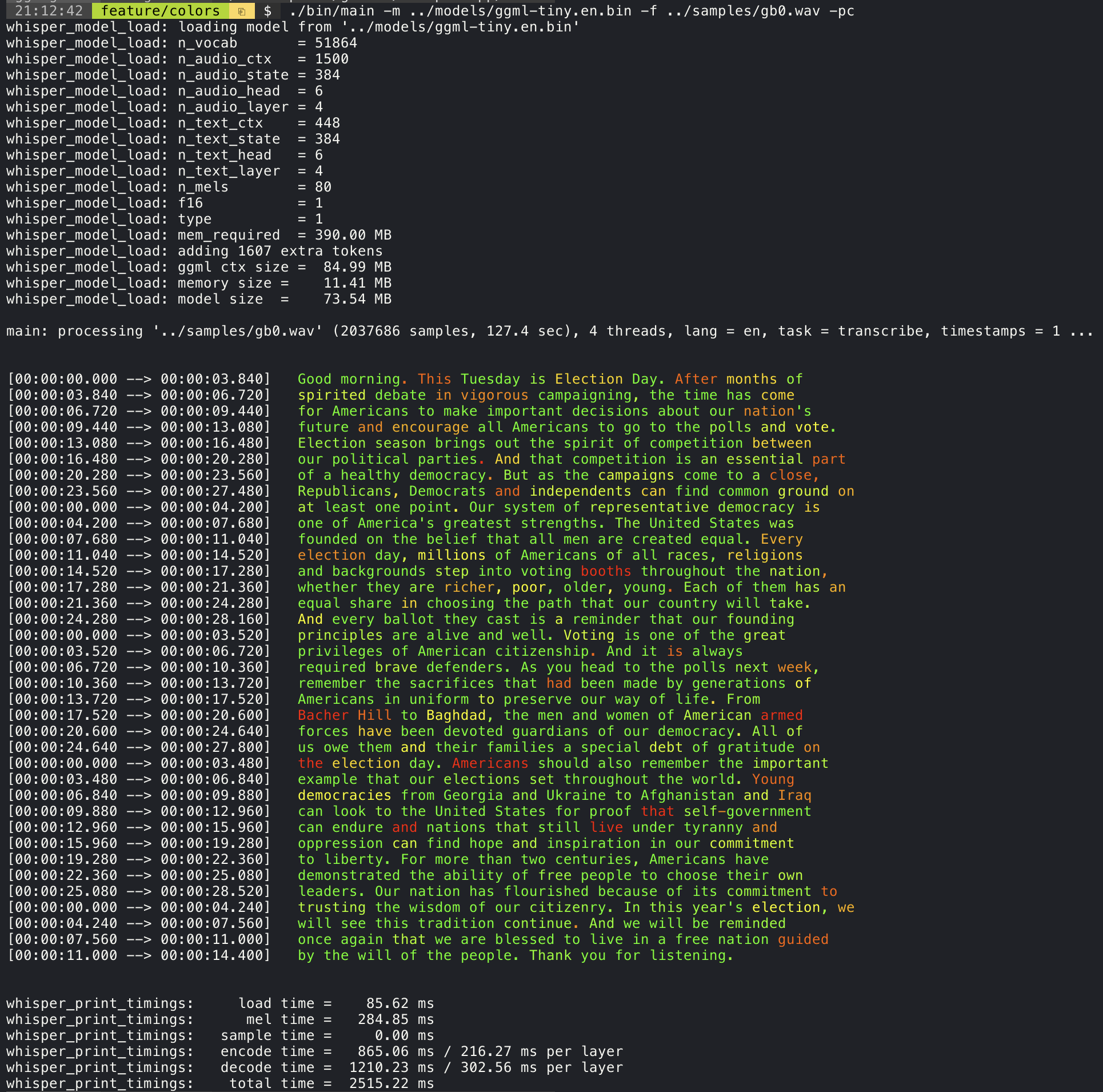
Confidence color-coding
Adding the --print-colors argument will print the transcribed text using an experimental color coding strategy
to highlight words with high or low confidence:
./build/bin/whisper-cli -m models/ggml-base.en.bin -f samples/gb0.wav --print-colors
Controlling the length of the generated text segments (experimental)
For example, to limit the line length to a maximum of 16 characters, simply add -ml 16:
$ ./build/bin/whisper-cli -m ./models/ggml-base.en.bin -f ./samples/jfk.wav -ml 16

whisper_model_load: loading model from './models/ggml-base.en.bin'
...
system_info: n_threads = 4 / 10 | AVX2 = 0 | AVX512 = 0 | NEON = 1 | FP16_VA = 1 | WASM_SIMD = 0 | BLAS = 1 |

main: processing './samples/jfk.wav' (176000 samples, 11.0 sec), 4 threads, 1 processors, lang = en, task = transcribe, timestamps = 1 ...

[00:00:00.000 --> 00:00:00.850]   And so my
[00:00:00.850 --> 00:00:01.590]   fellow
[00:00:01.590 --> 00:00:04.140]   Americans, ask
[00:00:04.140 --> 00:00:05.660]   not what your
[00:00:05.660 --> 00:00:06.840]   country can do
[00:00:06.840 --> 00:00:08.430]   for you, ask
[00:00:08.430 --> 00:00:09.440]   what you can do
[00:00:09.440 --> 00:00:10.020]   for your
[00:00:10.020 --> 00:00:11.000]   country.
Word-level timestamp (experimental)
The --max-len argument can be used to obtain word-level timestamps. Simply use -ml 1:
$ ./build/bin/whisper-cli -m ./models/ggml-base.en.bin -f ./samples/jfk.wav -ml 1

whisper_model_load: loading model from './models/ggml-base.en.bin'
...
system_info: n_threads = 4 / 10 | AVX2 = 0 | AVX512 = 0 | NEON = 1 | FP16_VA = 1 | WASM_SIMD = 0 | BLAS = 1 |

main: processing './samples/jfk.wav' (176000 samples, 11.0 sec), 4 threads, 1 processors, lang = en, task = transcribe, timestamps = 1 ...

[00:00:00.000 --> 00:00:00.320]
[00:00:00.320 --> 00:00:00.370]   And
[00:00:00.370 --> 00:00:00.690]   so
[00:00:00.690 --> 00:00:00.850]   my
[00:00:00.850 --> 00:00:01.590]   fellow
[00:00:01.590 --> 00:00:02.850]   Americans
[00:00:02.850 --> 00:00:03.300]  ,
[00:00:03.300 --> 00:00:04.140]   ask
[00:00:04.140 --> 00:00:04.990]   not
[00:00:04.990 --> 00:00:05.410]   what
[00:00:05.410 --> 00:00:05.660]   your
[00:00:05.660 --> 00:00:06.260]   country
[00:00:06.260 --> 00:00:06.600]   can
[00:00:06.600 --> 00:00:06.840]   do
[00:00:06.840 --> 00:00:07.010]   for
[00:00:07.010 --> 00:00:08.170]   you
[00:00:08.170 --> 00:00:08.190]  ,
[00:00:08.190 --> 00:00:08.430]   ask
[00:00:08.430 --> 00:00:08.910]   what
[00:00:08.910 --> 00:00:09.040]   you
[00:00:09.040 --> 00:00:09.320]   can
[00:00:09.320 --> 00:00:09.440]   do
[00:00:09.440 --> 00:00:09.760]   for
[00:00:09.760 --> 00:00:10.020]   your
[00:00:10.020 --> 00:00:10.510]   country
[00:00:10.510 --> 00:00:11.000]  .
Speaker segmentation via tinydiarize (experimental)
More information about this approach is available here: https://github.com/ggml-org/whisper.cpp/pull/1058
Sample usage:
# download a tinydiarize compatible model
./models/download-ggml-model.sh small.en-tdrz

# run as usual, adding the "-tdrz" command-line argument
./build/bin/whisper-cli -f ./samples/a13.wav -m ./models/ggml-small.en-tdrz.bin -tdrz
...
main: processing './samples/a13.wav' (480000 samples, 30.0 sec), 4 threads, 1 processors, lang = en, task = transcribe, tdrz = 1, timestamps = 1 ...
...
[00:00:00.000 --> 00:00:03.800]   Okay Houston, we've had a problem here. [SPEAKER_TURN]
[00:00:03.800 --> 00:00:06.200]   This is Houston. Say again please. [SPEAKER_TURN]
[00:00:06.200 --> 00:00:08.260]   Uh Houston we've had a problem.
[00:00:08.260 --> 00:00:11.320]   We've had a main beam up on a volt. [SPEAKER_TURN]
[00:00:11.320 --> 00:00:13.820]   Roger main beam interval. [SPEAKER_TURN]
[00:00:13.820 --> 00:00:15.100]   Uh uh [SPEAKER_TURN]
[00:00:15.100 --> 00:00:18.020]   So okay stand, by thirteen we're looking at it. [SPEAKER_TURN]
[00:00:18.020 --> 00:00:25.740]   Okay uh right now uh Houston the uh voltage is uh is looking good um.
[00:00:27.620 --> 00:00:29.940]   And we had a a pretty large bank or so.
Karaoke-style movie generation (experimental)
The whisper-cli example provides support for output of karaoke-style movies, where the
currently pronounced word is highlighted. Use the -owts argument and run the generated bash script.
This requires to have ffmpeg installed.
Here are a few "typical" examples:
./build/bin/whisper-cli -m ./models/ggml-base.en.bin -f ./samples/jfk.wav -owts
source ./samples/jfk.wav.wts
ffplay ./samples/jfk.wav.mp4
https://user-images.githubusercontent.com/1991296/199337465-dbee4b5e-9aeb-48a3-b1c6-323ac4db5b2c.mp4
./build/bin/whisper-cli -m ./models/ggml-base.en.bin -f ./samples/mm0.wav -owts
source ./samples/mm0.wav.wts
ffplay ./samples/mm0.wav.mp4
https://user-images.githubusercontent.com/1991296/199337504-cc8fd233-0cb7-4920-95f9-4227de3570aa.mp4
./build/bin/whisper-cli -m ./models/ggml-base.en.bin -f ./samples/gb0.wav -owts
source ./samples/gb0.wav.wts
ffplay ./samples/gb0.wav.mp4
https://user-images.githubusercontent.com/1991296/199337538-b7b0c7a3-2753-4a88-a0cd-f28a317987ba.mp4
Video comparison of different models
Use the scripts/bench-wts.sh script to generate a video in the following format:
./scripts/bench-wts.sh samples/jfk.wav
ffplay ./samples/jfk.wav.all.mp4
https://user-images.githubusercontent.com/1991296/223206245-2d36d903-cf8e-4f09-8c3b-eb9f9c39d6fc.mp4
Benchmarks
In order to have an objective comparison of the performance of the inference across different system configurations, use the whisper-bench tool. The tool simply runs the Encoder part of the model and prints how much time it took to execute it. The results are summarized in the following Github issue:
Additionally a script to run whisper.cpp with different models and audio files is provided bench.py.
You can run it with the following command, by default it will run against any standard model in the models folder.
python3 scripts/bench.py -f samples/jfk.wav -t 2,4,8 -p 1,2
It is written in python with the intention of being easy to modify and extend for your benchmarking use case.
It outputs a csv file with the results of the benchmarking.
ggml format
The original models are converted to a custom binary format. This allows to pack everything needed into a single file:
- model parameters
- mel filters
- vocabulary
- weights
You can download the converted models using the models/download-ggml-model.sh script or manually from here:
For more details, see the conversion script models/convert-pt-to-ggml.py or models/README.md.
Bindings
- Rust: tazz4843/whisper-rs | #310
- JavaScript: bindings/javascript | #309
- React Native (iOS / Android): whisper.rn
- Go: bindings/go | #312
- Java:
- Ruby: bindings/ruby | #507
- Objective-C / Swift: ggml-org/whisper.spm | #313
- .NET: | #422
- Python: | #9
- stlukey/whispercpp.py (Cython)
- AIWintermuteAI/whispercpp (Updated fork of aarnphm/whispercpp)
- aarnphm/whispercpp (Pybind11)
- abdeladim-s/pywhispercpp (Pybind11)
- R: bnosac/audio.whisper
- Unity: macoron/whisper.unity
XCFramework
The XCFramework is a precompiled version of the library for iOS, visionOS, tvOS, and macOS. It can be used in Swift projects without the need to compile the library from source. For example, the v1.7.5 version of the XCFramework can be used as follows:
// swift-tools-version: 5.10
// The swift-tools-version declares the minimum version of Swift required to build this package.

import PackageDescription

let package = Package(
    name: "Whisper",
    targets: [
        .executableTarget(
            name: "Whisper",
            dependencies: [
                "WhisperFramework"
            ]),
        .binaryTarget(
            name: "WhisperFramework",
            url: "https://github.com/ggml-org/whisper.cpp/releases/download/v1.7.5/whisper-v1.7.5-xcframework.zip",
            checksum: "c7faeb328620d6012e130f3d705c51a6ea6c995605f2df50f6e1ad68c59c6c4a"
        )
    ]
)
Voice Activity Detection (VAD)
Support for Voice Activity Detection (VAD) can be enabled using the --vad
argument to whisper-cli. In addition to this option a VAD model is also
required.
The way this works is that first the audio samples are passed through the VAD model which will detect speech segments. Using this information the only the speech segments that are detected are extracted from the original audio input and passed to whisper for processing. This reduces the amount of audio data that needs to be processed by whisper and can significantly speed up the transcription process.
The following VAD models are currently supported:
Silero-VAD
Silero-vad is a lightweight VAD model written in Python that is fast and accurate.
Models can be downloaded by running the following command on Linux or MacOS:
$ ./models/download-vad-model.sh silero-v6.2.0
Downloading ggml model silero-v6.2.0 from 'https://huggingface.co/ggml-org/whisper-vad' ...
ggml-silero-v6.2.0.bin        100%[==============================================>] 864.35K  --.-KB/s    in 0.04s
Done! Model 'silero-v6.2.0' saved in '/path/models/ggml-silero-v6.2.0.bin'
You can now use it like this:

  $ ./build/bin/whisper-cli -vm /path/models/ggml-silero-v6.2.0.bin --vad -f samples/jfk.wav -m models/ggml-base.en.bin
And the following command on Windows:
> .\models\download-vad-model.cmd silero-v6.2.0
Downloading vad model silero-v6.2.0...
Done! Model silero-v6.2.0 saved in C:\Users\danie\work\ai\whisper.cpp\ggml-silero-v6.2.0.bin
You can now use it like this:

C:\path\build\bin\Release\whisper-cli.exe -vm C:\path\ggml-silero-v6.2.0.bin --vad -m models/ggml-base.en.bin -f samples\jfk.wav
To see a list of all available models, run the above commands without any arguments.
This model can be also be converted manually to ggml using the following command:
$ python3 -m venv venv && source venv/bin/activate
$ (venv) pip install silero-vad
$ (venv) $ python models/convert-silero-vad-to-ggml.py --output models/silero.bin
Saving GGML Silero-VAD model to models/silero-v6.2.0-ggml.bin
And it can then be used with whisper as follows:
$ ./build/bin/whisper-cli \
   --file ./samples/jfk.wav \
   --model ./models/ggml-base.en.bin \
   --vad \
   --vad-model ./models/silero-v6.2.0-ggml.bin
VAD Options
-
--vad-threshold: Threshold probability for speech detection. A probability for a speech segment/frame above this threshold will be considered as speech.
-
--vad-min-speech-duration-ms: Minimum speech duration in milliseconds. Speech segments shorter than this value will be discarded to filter out brief noise or false positives.
-
--vad-min-silence-duration-ms: Minimum silence duration in milliseconds. Silence periods must be at least this long to end a speech segment. Shorter silence periods will be ignored and included as part of the speech.
-
--vad-max-speech-duration-s: Maximum speech duration in seconds. Speech segments longer than this will be automatically split into multiple segments at silence points exceeding 98ms to prevent excessively long segments.
-
--vad-speech-pad-ms: Speech padding in milliseconds. Adds this amount of padding before and after each detected speech segment to avoid cutting off speech edges.
-
--vad-samples-overlap: Amount of audio to extend from each speech segment into the next one, in seconds (e.g., 0.10 = 100ms overlap). This ensures speech isn't cut off abruptly between segments when they're concatenated together.
Examples
There are various examples of using the library for different projects in the examples folder. Some of the examples are even ported to run in the browser using WebAssembly. Check them out!
| Example | Web | Description |
|---|---|---|
| whisper-cli | whisper.wasm | Tool for translating and transcribing audio using Whisper |
| whisper-bench | bench.wasm | Benchmark the performance of Whisper on your machine |
| whisper-stream | stream.wasm | Real-time transcription of raw microphone capture |
| whisper-command | command.wasm | Basic voice assistant example for receiving voice commands from the mic |
| whisper-server | HTTP transcription server with OAI-like API | |
| whisper-talk-llama | Talk with a LLaMA bot | |
| whisper.objc | iOS mobile application using whisper.cpp | |
| whisper.swiftui | SwiftUI iOS / macOS application using whisper.cpp | |
| whisper.android | Android mobile application using whisper.cpp | |
| whisper.nvim | Speech-to-text plugin for Neovim | |
| generate-karaoke.sh | Helper script to easily generate a karaoke video of raw audio capture | |
| livestream.sh | Livestream audio transcription | |
| yt-wsp.sh | Download + transcribe and/or translate any VOD (original) | |
| wchess | wchess.wasm | Voice-controlled chess |
Discussions
If you have any kind of feedback about this project feel free to use the Discussions section and open a new topic.
You can use the Show and tell category
to share your own projects that use whisper.cpp. If you have a question, make sure to check the
Frequently asked questions (#126) discussion.